tldr: Playwright MCP launched in 2025. In 2026, most engineering leaders still don't know what it means for their testing strategy.
You can now spin up an AI agent that writes and runs browser tests in 30 minutes. No custom integrations. No vision model APIs. Just a standard protocol that connects any AI to Playwright.
The question isn't "is this technically possible anymore." It's "should we build this ourselves or buy a managed solution?" The demo shows 30 minutes to first test. What it doesn't show: 6-12 months to production-ready, and $180K+ in engineering cost.
I believe every engineering leader evaluating AI testing needs to understand this trade-off. This article breaks down what Playwright MCP gives you, what it doesn't, and when building makes sense.
What is Playwright MCP?
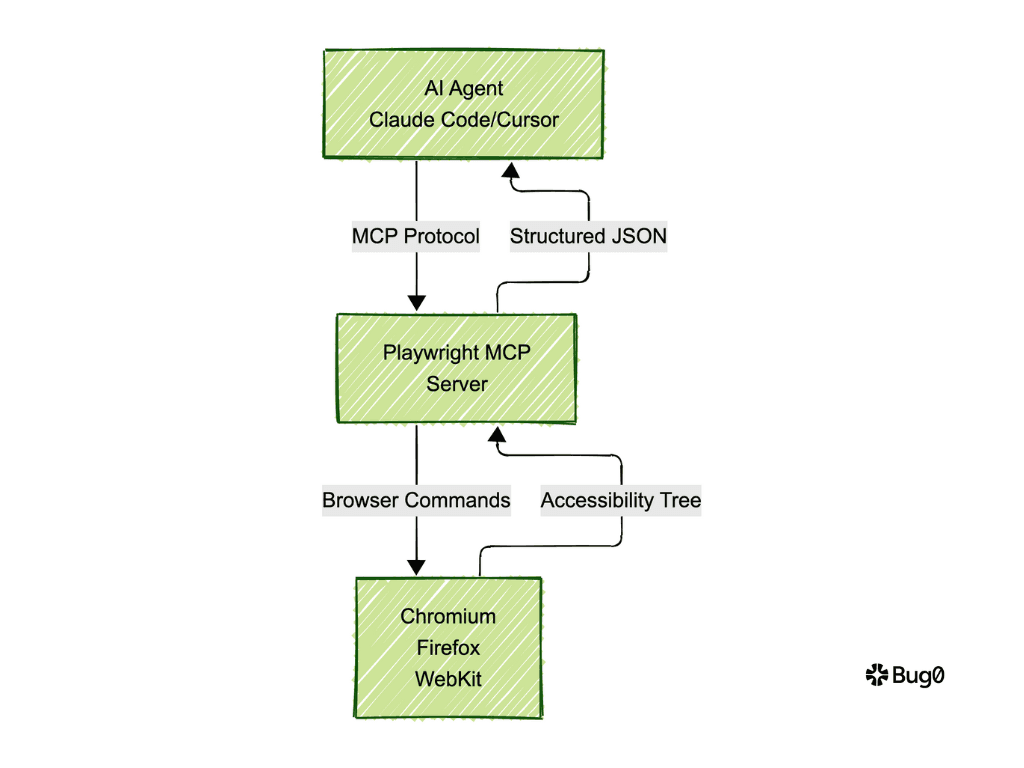
Playwright MCP is a Model Context Protocol server from Microsoft that connects AI agents to Playwright's browser automation capabilities. The open-source Playwright MCP server (@playwright/mcp npm package) exposes 25+ tools for browser control through structured, LLM-friendly APIs. No vision models required. No screenshot processing. Just accessibility tree snapshots.
This answers the fundamental question of what is Playwright MCP. It's infrastructure. It's the bridge between AI agents (Claude Code, Cursor, VS Code Copilot) and browser automation.
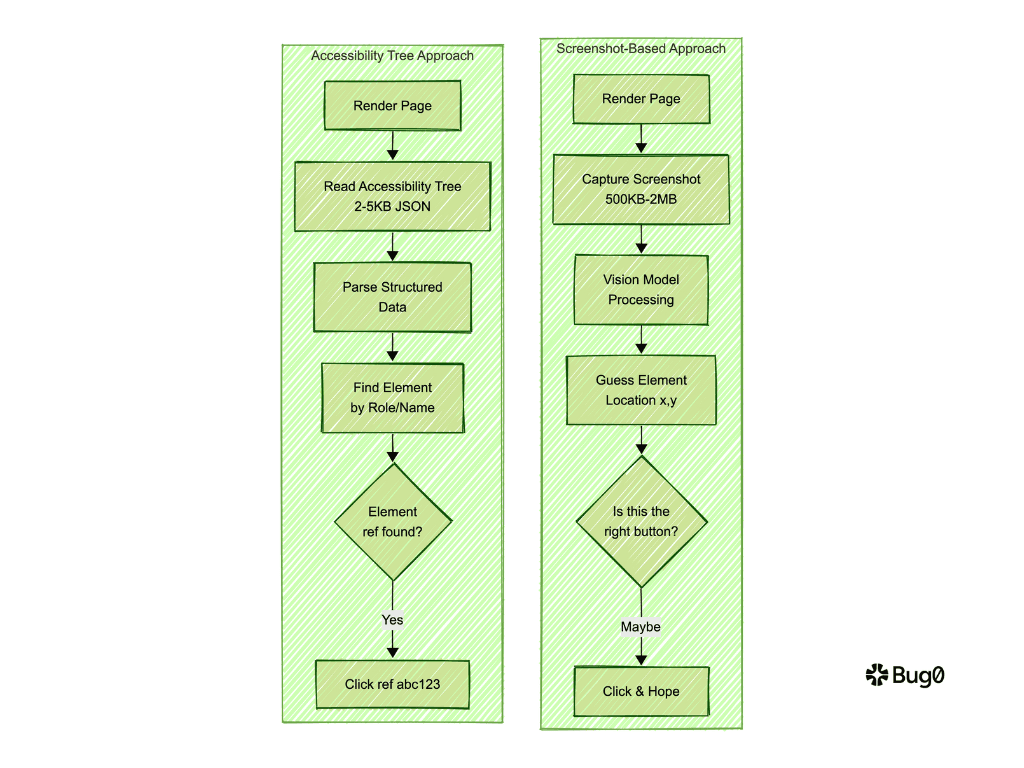
Traditional screenshot-based approaches are slow and expensive. Vision models process 500KB-2MB images per interaction. Playwright MCP uses accessibility tree snapshots instead. 2-5KB of structured data. 10-100x faster. Because every second of latency compounds when you're running hundreds of tests. Microsoft playwright mcp makes AI-assisted testing economically viable.
Manual Playwright script writing doesn't scale. You write await page.click('#submit-button'). The button ID changes. Your test breaks. Playwright MCP standardizes how AI tools control browsers. The AI agent describes what it wants to click. The MCP server handles the implementation details.
Here's how Playwright MCP works technically. It runs as a standalone server (npx @playwright/mcp@latest) or embedded service. It provides mcp server browser automation through 25+ tools:
-
browser_navigate- Navigate to URLs -
browser_click- Click elements by accessibility reference -
browser_snapshot- Capture page structure via accessibility tree -
browser_fill_form- Fill multiple form fields -
browser_take_screenshot- Evidence collection
The key advantage: deterministic tool application. No "click at x,y coordinates" ambiguity. Element references are unique and stable. Reduced hallucination risk for AI agents.
Available on GitHub at microsoft/playwright-mcp. Works with any MCP-compatible AI client: Claude Desktop, Cursor, Claude Code, VS Code Copilot.
Quick install for Claude Code:
claude mcp add playwright npx @playwright/mcp@latest
That's playwright mcp setup in one line. Now you have an AI agent that can control browsers.
The Build vs. Buy Equation Just Changed
Your eng team spends 40% of QA cycles maintaining brittle tests. Selectors break. Tests flake. Someone has to fix them. Every deploy.
You're evaluating three paths:
-
Build custom AI testing with Playwright MCP
-
Buy Bug0 or similar managed solution
-
Keep manual testing
The ROI case for "build" looks more compelling now. MCP lowers initial cost. Your engineers will tell you they can ship a working demo in a sprint. They're not lying.
But the total cost of ownership story hasn't changed. You're not buying infrastructure. You're buying 12 months of engineering focus.
What Playwright MCP actually gives you
No more reinventing browser automation infrastructure. You get 25+ standardized tools (navigate, click, fill forms, snapshots). Zero cost. Open source. NPM install. Done.
Setup time: 30 minutes for a working demo.
Your eng team's reaction: "We could build this ourselves now."
They're right about the demo. The playwright mcp tutorial takes less than an hour. Install @playwright/mcp. Connect it to Claude Code. Prompt the AI: "Navigate to our app and click the login button." It works.
The demo lies by omission.
The infrastructure trap: why "working" isn't "production-ready"
The intelligence layer you still have to build
MCP gives you browser automation. It doesn't tell you which flows to test. That's product judgment. It doesn't write assertions that catch real bugs. That's business logic. It doesn't decide when tests run. That's CI/CD strategy.
You're not automating tests. You're building a testing platform. Different problem.
The maintenance tax no one mentions
Tests break when your UI changes. MCP doesn't fix selectors automatically. Someone wakes up to "Add to Cart" button failures after every deploy.
Building self-healing that actually works will consume 1-2 engineers for an entire quarter. Not side project work. Full focus. You need selector recovery logic. Alternative locator strategies. Automatic test code updates. This isn't a library you npm install.
Or you skip that quarter. Passmark is open source and solves this. AI handles discovery and repair. Playwright handles execution. Caching avoids the LLM tax on every run. The self-healing layer you'd spend a quarter building, already built.
The flake problem that kills adoption
Network timeouts. Race conditions. Timing issues. MCP doesn't distinguish real bugs from infrastructure noise. Your team stops trusting the tests within weeks.
Fixing this correctly eats 2-3 engineering months. Statistical failure analysis. Smart retry logic with exponential backoff. Baseline establishment per test. This is the work that separates demos from production systems.
The operational burden you're not counting
200 tests run nightly. 30 fail. Which ones matter? Who investigates? When do you page someone?
You need screenshot diffing. Log aggregation. Failure clustering. Intelligent alerting. This takes 1-2 engineers a full quarter to build properly. Then someone has to maintain it.
The back-of-the-napkin math
Let me show you what building on Playwright MCP actually costs. Not the infrastructure. The engineering focus.
Year one (DIY Playwright MCP):
Initial build: 2-4 weeks × $200K engineer / 52 weeks = $8K-$15K
Getting to production-ready (self-healing, flake handling, reporting): 6-12 months of 1-2 engineers = $100K-$200K
Ongoing maintenance: 0.5-1.0 FTE = $100K-$200K per year
Total year one: $208K-$415K
But that's not the real cost.
The hidden tax: context switching
An engineer "maintaining" a test suite isn't cleanly 0.5 FTE. It's constant interruptions. Tests break after every UI deploy. Someone has to triage. Is it a real bug? Is it a flaky selector? Should we disable the test or fix it?
That engineer isn't doing deep work anymore. They're firefighting. You're not paying for 0.5 FTE maintenance. You're degrading your most expensive engineer's output by 40%.
One of your senior engineers becomes the "testing person." That's who everyone Slacks when tests fail. That's who reviews every "skip this flaky test" PR. That's who gets pulled into meetings about "why are we investing in this again?"
Year one (Bug0):
Subscription: $3K-$30K. Done. No eng cost. No context switching. No testing person.
Year one (keep manual testing):
QA spends 40% of cycles on regression. That's $60K-$80K in pure QA time. Plus the bugs that reach production because manual testing doesn't scale. Calculate what one critical bug in production costs you. Usually more than the entire annual QA budget.
More on the hidden costs: QA reality check: Why your engineering budget is $600K higher than you think in 2026.
Related: why browser agents won't fix QA in 2026.
When DIY with Playwright MCP actually wins
Data sovereignty: Financial services, healthcare with strict compliance requirements that prevent SaaS tools.
Extreme customization: Testing patterns no vendor supports. Embedded devices. Custom protocols. Hardware-in-the-loop testing.
Sufficient eng capacity: You have 2+ engineers who can own this long-term. Not just build. Maintain. Improve. Respond to issues.
Internal tooling culture: Your company builds vs. buys. Stripe scale. Netflix scale. You contribute to open-source. You have platform teams.
When Bug0 wins (most companies)
Speed to value: Need tests covering critical flows in days, not months.
No QA specialists: Small eng team. Everyone ships features. No one wants to maintain testing infrastructure.
Outcome-focused: Care about "do we catch bugs" not "do we own infrastructure."
Lean operations: $3K-$30K/year subscription beats $250K eng cost. The math is straightforward.
Playwright MCP is like Kubernetes or Postgres. Open-source infrastructure that's technically impressive. Solves real problems. And absolutely not something you should run yourself unless you have 5+ engineers to dedicate. In 2026, most companies overestimate their ability to maintain homegrown testing infrastructure.
Why This Approach Actually Works
Here's what makes accessibility tree automation different.
The accessibility tree breakthrough
Traditional AI testing tries to "see" the screen like a human. Vision models process screenshots. 500KB-2MB images per interaction. Slow. Expensive. Unreliable when button colors change or layouts shift.
Playwright MCP says "forget the pixels, read the code's intent."
Instead of rendering pixels, it reads the accessibility tree. The DOM's skeleton. Structured data about every interactive element. Names, roles, states. What's clickable. What's editable. What the user can actually do.
Example of what the AI sees:
- button "Submit": clickable, visible, ref="abc123"
- textbox "Email": editable, value="", ref="def456"
- link "Forgot password?": clickable, visible, ref="ghi789"
2-5KB of structured JSON. No image processing. No "is that button blue or teal?" ambiguity. The LLM reads this and understands the page instantly.
When the AI wants to click Submit, it tells MCP "click ref abc123." Deterministic. No hallucination. No "I thought I saw a button in the top right."
Playwright mcp browser automation works because it doesn't try to simulate human vision. It reads the machine-readable structure browsers already maintain for screen readers. Because deterministic beats probabilistic when you're automating critical flows that cost money when they break.
What you actually get
It exposes everything from clicks to network intercepts as structured JSON tools. Navigate. Fill forms. Take screenshots. Capture console errors. Intercept API calls. Run JavaScript. All packaged as tools an LLM can call reliably.
Multi-browser support. Chrome, Firefox, WebKit. Puppeteer only does Chrome. Because your users don't all run Chrome. Your product team will ask for Safari testing eventually. Playwright mcp vs puppeteer isn't academic. It's about not rewriting everything when that ask comes.
The AI client spawns the Playwright MCP server as a subprocess. Communication happens via stdin/stdout. No network calls. No latency. The LLM calls a tool. MCP executes it. Returns structured results. Fast loop.
Configuration you should know
Basic setup:
{
  "mcpServers": {
    "playwright": {
      "command": "npx",
      "args": ["@playwright/mcp@latest"]
    }
  }
}
For production, lock it down:
{
  "mcpServers": {
    "playwright": {
      "command": "npx",
      "args": [
        "@playwright/mcp@latest",
        "--isolated",
        "--allowed-origins=https://yourapp.com",
        "--headless"
      ]
    }
  }
}
You can restrict which sites the AI navigates to. Which files it can upload. Whether it runs headless or shows the browser. Sane defaults for security.
More on how playwright test agents use this: Playwright Test Agents: AI Testing Explained.
The 30-Minute "Aha!" Moment
Let's install playwright mcp and see what the hype is about.
Installation (5 minutes)
Prerequisites: Node.js 18+, MCP client (VS Code, Claude Desktop, Cursor)
For Claude Code:
claude mcp add playwright npx @playwright/mcp@latest
This is how to use playwright mcp with Claude Code. One command. The MCP server installs automatically.
For Cursor:
Go to Cursor Settings → MCP → Add new MCP Server. Set command to npx @playwright/mcp@latest.
Or use the cursor playwright mcp quick link in Settings.
For Claude Desktop:
Edit ~/Library/Application Support/Claude/claude_desktop_config.json:
{
  "mcpServers": {
    "playwright": {
      "command": "npx",
      "args": ["@playwright/mcp@latest"]
    }
  }
}
Restart Claude Desktop. You'll see "Playwright" in the available MCP servers list.
For Docker (playwright mcp docker):
docker run -i --rm mcr.microsoft.com/playwright/mcp --headless --no-sandbox
Useful for CI environments. No persistent state. Clean browser every run.
Configuration options
Add flags for headless mode, allowed origins, or custom ports:
npx @playwright/mcp@latest --headless --allowed-origins https://yourapp.com
Common playwright mcp features flags:
-
--headless: Run browser without GUI (required for CI) -
--no-sandbox: Disable Chrome sandbox (required for Docker) -
--isolated: Use isolated browser context (no persistent state) -
--save-trace: Record Playwright trace for debugging -
--output-dir ./test-results: Save screenshots/videos -
--allowed-origins https://app.com: Security restriction -
--viewport-size 1920x1080: Set browser window size
Full list: playwright mcp documentation.
Your first automation (10 minutes)
Prompt your AI agent:
"Using Playwright MCP, navigate to example.com, click the 'Sign Up' button, fill out the registration form with my email, and take a screenshot of the confirmation page."
What happens behind the scenes:
-
AI agent calls
browser_navigatetool with URL "https://example.com" -
Calls
browser_snapshotto get page structure via accessibility tree -
Parses snapshot, identifies button with text "Sign Up"
-
Calls
browser_clickwith element reference -
Calls
browser_snapshotagain to see form fields -
Calls
browser_fill_formwith email field data -
Calls
browser_take_screenshotfor evidence
This is playwright mcp browser automation in action. The AI agent orchestrates. The MCP server executes. You get reliable automation without writing Playwright code.
Running in CI/CD
Run in GitHub Actions with playwright mcp headless mode:
- name: Run Playwright MCP Tests
  run: npx @playwright/mcp@latest --headless --no-sandbox
For more comprehensive playwright mcp integration patterns, see: Pull Request Testing: Automate QA Without Slowing Developers in 2026.
Common issues (troubleshooting)
Timeout errors: Increase navigation timeout with --timeout-navigation 90000 (90 seconds) or action timeout with --timeout-action 10000 (10 seconds).
Persistent profile locations: Chrome stores profiles in ~/.cache/ms-playwright/mcp-chrome-profile (Linux), ~/Library/Caches/ms-playwright/mcp-chrome-profile (macOS), or %USERPROFILE%\AppData\Local\ms-playwright\mcp-chrome-profile (Windows). Delete these directories to reset state.
CORS/origin restrictions: Use --allowed-origins=* to disable origin checks (testing only). For production, specify exact origins: --allowed-origins=https://app.com,https://staging.app.com.
File upload restrictions: By default, file uploads restricted to workspace roots. Use --allow-unrestricted-file-access for testing scenarios where you need broader access.
Pro tips
Debugging: Use --save-trace to record Playwright traces. Open them with npx playwright show-trace trace.zip. See exactly what the browser did.
Visual confirmation: Start with --headless=false to watch automation. Confirms it's doing what you expect. Switch to headless for CI.
Organized artifacts: Configure --output-dir ./test-results to keep screenshots, traces, and videos in one place.
Documentation reference: Check the playwright mcp server setup guide for all available options and examples.
What This Means for Your Roadmap
In 2026, the "we can build this ourselves" conversation just got harder to dismiss.
Before Playwright MCP
Your team says: "Let's build AI testing."
You know: It's 12+ months. They're underestimating complexity.
After Playwright MCP
Your team says: "We can do this in a sprint with MCP."
They're not completely wrong… The demo works in a sprint.
The trap: Prototype in a sprint. Production-ready in 12 months. Same as before.
Your response: "Show me the maintenance plan beyond month 6…"
Vendor selection criteria changed
Old question: "Do they support our tech stack?"
New question: "Are they building on standards (MCP) or proprietary lock-in?"
MCP-based tools can interoperate. Open-source standards prevent vendor lock-in. Proprietary tools can't. If you build custom test generation logic on Playwright MCP, you could potentially switch to a different MCP-compatible execution environment later. Standards matter.
Bug0 is Playwright-based under the hood. But we add the layer that actually matters. Intelligent test generation. Self-healing. Outcome focus. You're not buying browser automation. You're buying tests that catch bugs. For context: QA as a Service: The Secret to High-Velocity Development.
Hybrid strategies make more sense now
Pattern 1: Bug0 for core flows (checkout, login, critical paths). Playwright MCP for edge cases.
Pattern 2: Start with Bug0 for speed. Evaluate DIY MCP after 6 months of learning.
Pattern 3: Use Playwright MCP for internal tools. Bug0 for customer-facing apps.
You don't have to pick one. Standardization enables mixing.
Questions to ask your team
If they propose building on Playwright MCP:
-
Who owns this after the engineer who built it leaves?
-
What's our plan when tests start failing after every deploy?
-
How do we prioritize which tests to write first? (Product question, not eng question)
-
What does success look like in 12 months? (If it's "we saved money," you're lying to yourself)
If they propose buying Bug0 or similar:
-
What edge cases won't be covered by managed solution?
-
Can we use Playwright MCP for those edge cases without duplicating infra?
-
What's the cost if we're wrong and need to switch approaches in 6 months?
-
How do we measure ROI? (Hint: bugs caught per dollar, not tests written per dollar)
Decision framework
Build with Playwright MCP if: You have 2+ eng capacity. Need extreme customization. Have compliance requirements that prevent SaaS.
Buy Bug0 if: You want tests protecting prod in weeks not months. Care about outcomes not ownership. Operate lean.
Do nothing if: You enjoy explaining to your CEO why critical bugs keep reaching customers.
Why Accessibility Tree Standardization Wins
The playwright mcp vs puppeteer question comes up. Here's why it matters.
Comparison matrix
| Approach | Speed | LLM Compatibility | Cost | Maintenance | Browser Support |
|---|---|---|---|---|---|
| Playwright MCP (accessibility) | ⚡ Fast | ✅ Excellent | Open-source | Low | Chrome, Firefox, WebKit |
| Puppeteer MCP | ⚡ Fast | ✅ Good | Open-source | Low | Chrome only |
| Screenshot-based (vision models) | 🐢 Slow | ⚠️ Medium | $$$ (API costs) | Medium | All |
| Manual Playwright scripts | ⚡ Fast | ❌ Poor | Free | Very High | Chrome, Firefox, WebKit |
| Bug0 (managed + AI) | ⚡⚡ Fastest | ✅ Excellent | $$ | Zero | All modern browsers |
Multi-browser vs Chrome-only
Playwright MCP wins for most use cases:
Multi-browser support: Chrome, Firefox, WebKit vs. Puppeteer's Chrome-only. If you need cross-browser testing, this isn't a question.
Better accessibility tree support: Playwright's accessibility APIs are more mature. More reliable element identification.
More active development: microsoft/playwright-mcp is actively maintained open-source with weekly updates. Puppeteer MCP implementations are community-maintained. Less frequent updates.
Larger tool ecosystem: 25+ tools vs. Puppeteer's approximately 15. More capabilities out of the box.
Better integration: Claude Code, Cursor, and VS Code Copilot all document Playwright MCP first. Puppeteer MCP works but has less official support.
When each makes sense
Playwright MCP use cases:
-
AI-assisted browser automation (primary use case)
-
Multi-browser testing requirements
-
Claude Code, Cursor, anthropic mcp playwright integration
-
Custom internal tools with AI agents
-
Learning and experimentation with MCP servers
Puppeteer MCP:
-
Chrome-only workflows
-
Existing Puppeteer infrastructure you don't want to migrate
-
Lighter weight than Playwright (smaller dependency tree)
Screenshot + Vision Models:
-
Visual regression testing when pixel-perfect accuracy matters
-
Legacy apps without proper accessibility tree
-
Canvas or WebGL-heavy applications where accessibility tree doesn't help
Manual Scripts:
-
Highly deterministic flows that never change
-
Performance-critical testing (no AI inference overhead)
-
No AI integration needed
Bug0 (AI-Managed QA):
-
Production critical path testing
-
Teams without QA specialists
-
Fast-moving startups (ship features, not test infrastructure)
-
Outcome-focused (tests that actually catch bugs)
More comparisons: AI Testing Tools: What Works in 2026.
For context on modern testing approaches: Software Testing Basics for the AI Age.
What to Do Next
You're an engineering leader evaluating options. Here's a framework.
Step 1: Reality check your build capacity (5 minutes)
Count engineers who could own testing infrastructure long-term. Not just prototype. Maintain. Debug. Improve.
If answer is less than 2 dedicated engineers: Skip to Step 3.
If answer is 2+ engineers: Continue to Step 2.
Step 2: Run the Playwright MCP experiment (1-2 days)
Have an engineer spin up Playwright MCP and automate 3 critical flows.
Time how long it takes to:
-
Get first test running (should be less than 1 hour)
-
Make tests self-heal when UI changes (will take days to weeks)
-
Handle flaky tests gracefully (will take weeks to months)
Ask yourself: "Is this where we want engineering focus for the next year?"
Step 3: Compare against managed alternative (30 minutes)
Try Bug0 Studio. Generate 3 tests for the same flows in plain English.
Measure:
-
Time to first test
-
Time to production-ready tests
Calculate: (Your eng hourly rate × hours saved) - (Bug0 subscription cost)
If ROI is positive, you have your answer.
Step 4: Make the decision
Choose DIY MCP if: Compliance requires it. Customization is extreme. You have capacity.
Choose Bug0 if: ROI math works. Speed matters. Eng should ship features not maintain infra.
Choose hybrid if: 80% of flows work with Bug0. 20% need custom MCP.
No sales pitch, just math
Playwright MCP: $0 upfront, $180K-$300K year one (eng time).
Bug0: $3K-$30K year one, zero ongoing eng cost.
The question isn't "what's cheaper…" It's "where should your engineers spend time?"
Resources
Try Bug0 Studio for AI test generation in 30 seconds. Sign up free.
Playwright MCP GitHub open-source repo if you're building yourself.