tldr: Playwright Test Agents automate test planning, generation, and healing. They're a major step forward for browser automation, but intent-based testing is where QA is truly headed.
AI is changing how we test software. For years, teams wrote endless Playwright and Selenium scripts, fixing them every time the UI changed. It was slow and painful.
Now, Playwright’s new Test Agents promise a smarter way. They plan, generate, and even heal tests for you. It’s a big leap for browser automation.
But this is just the start. The real future is intent-based testing, where you describe what should happen, and AI figures out the rest. Is it? Let's find out.
What are Playwright Test Agents?
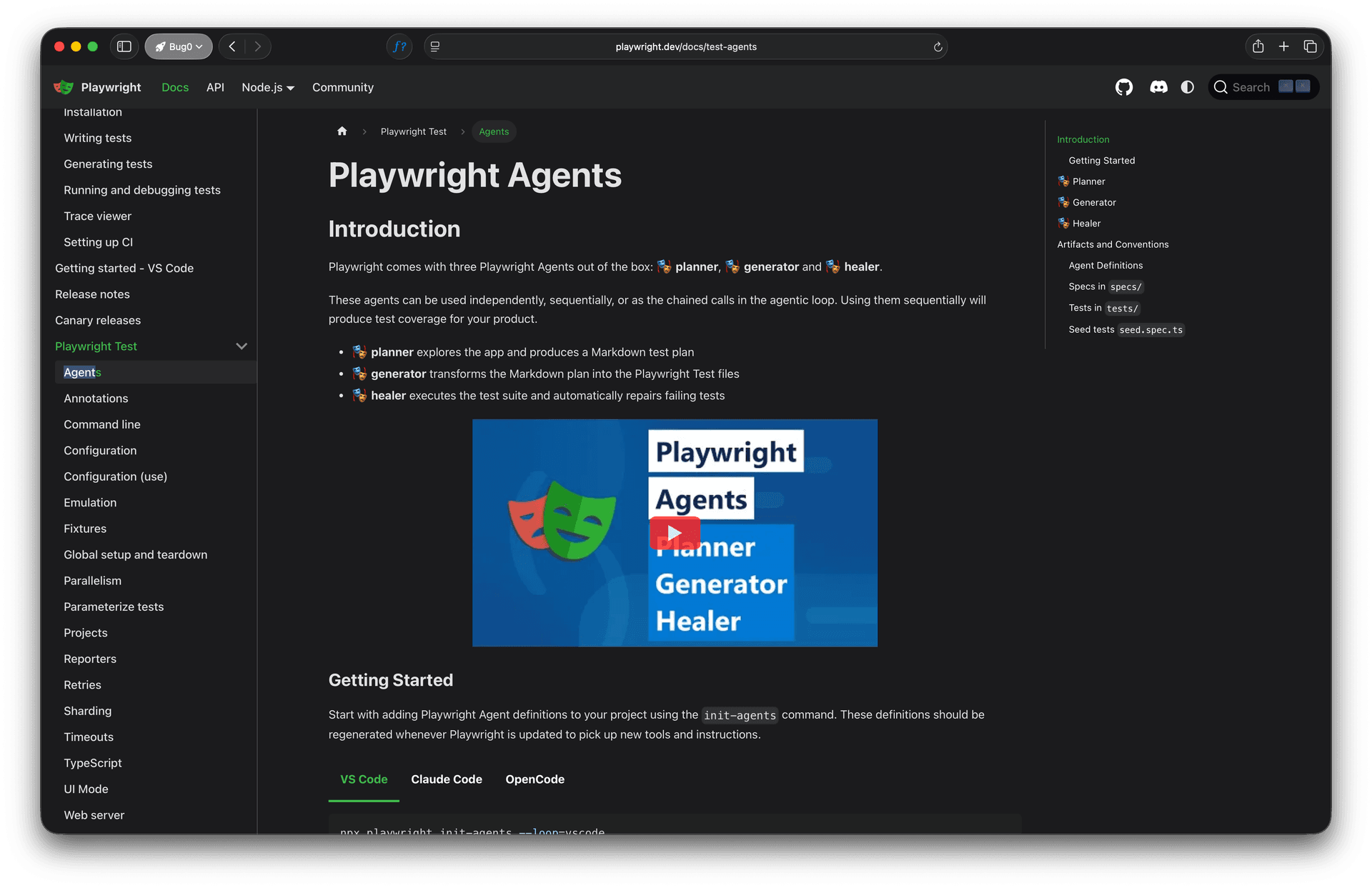
Playwright Test Agents are AI helpers inside Playwright. Each has a clear job:
-
Planner explores your app and writes a Markdown test plan.
-
Generator turns that plan into runnable Playwright code.
-
Healer watches for broken tests and fixes them automatically.
Playwright officially describes them as the three core agents you can use independently or in a loop to build test coverage. You can read more in the official documentation.
You start with a seed test that sets up your app's environment. The planner explores your app and generates Markdown plans in the specs/ folder. The generator reads these plans and produces actual Playwright test files inside the tests/ directory, verifying selectors and adding assertions.
The healer runs as part of the continuous agent loop. It monitors failures, executes the test suite, replays failing steps, identifies UI changes, suggests patches, and re-runs until successful. This agent ensures your suite remains reliable over time.
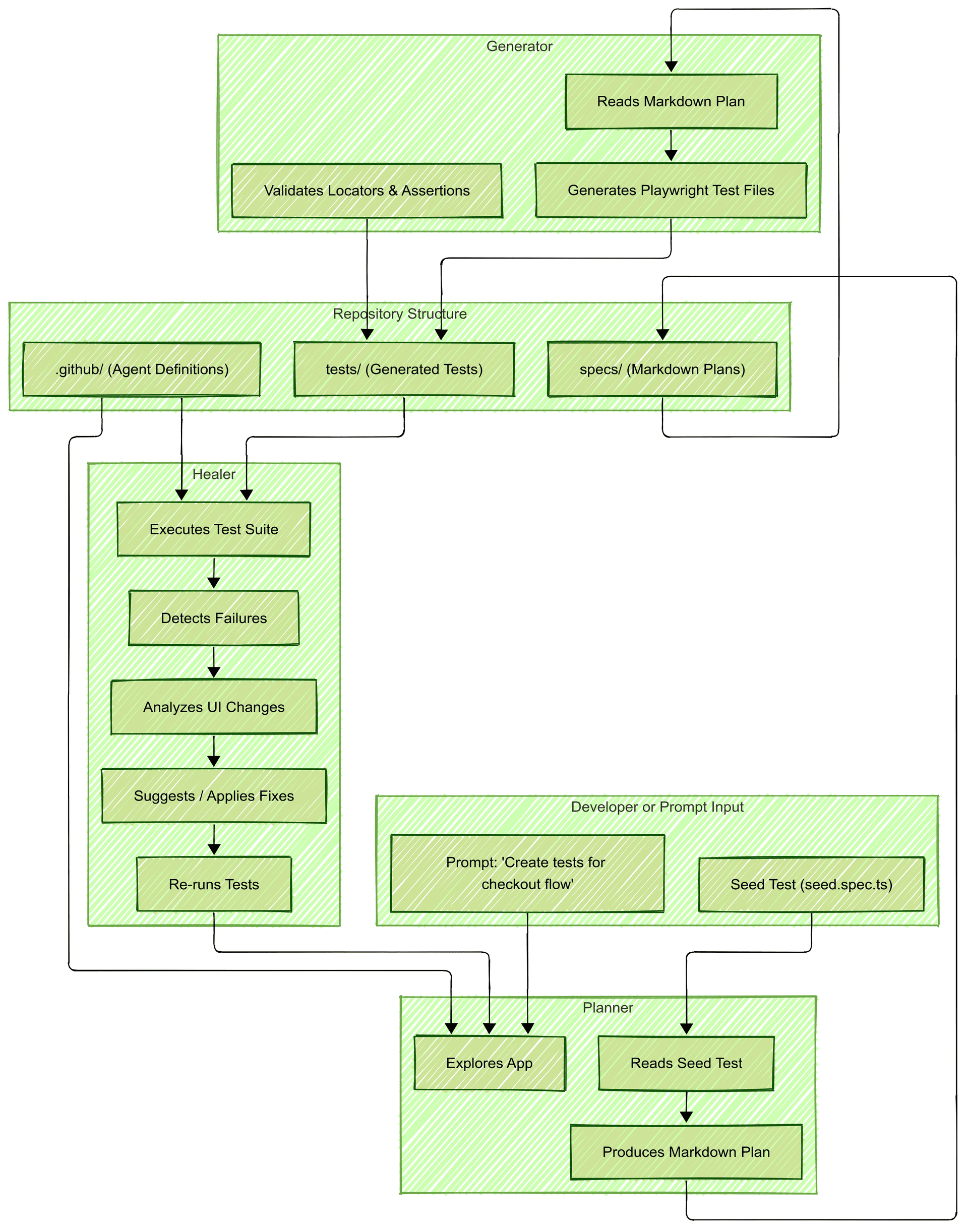
The official repo layout follows a clear structure:
.github/               # agent definitions
specs/                 # Markdown test plans
tests/                 # Generated Playwright tests
  seed.spec.ts         # seed test
  add-valid-todo.spec.ts
playwright.config.ts
Agent definitions live inside .github/ and must be regenerated when upgrading Playwright.
Together, these agents reduce manual work and keep your test suite alive. You can say, "Test the login flow," and it will plan and generate that test for you.
How Playwright Test Agents work
While the orchestration loop is not a user-facing API, it is the conceptual system behind the way Playwright coordinates its Planner, Generator, and Healer agents.
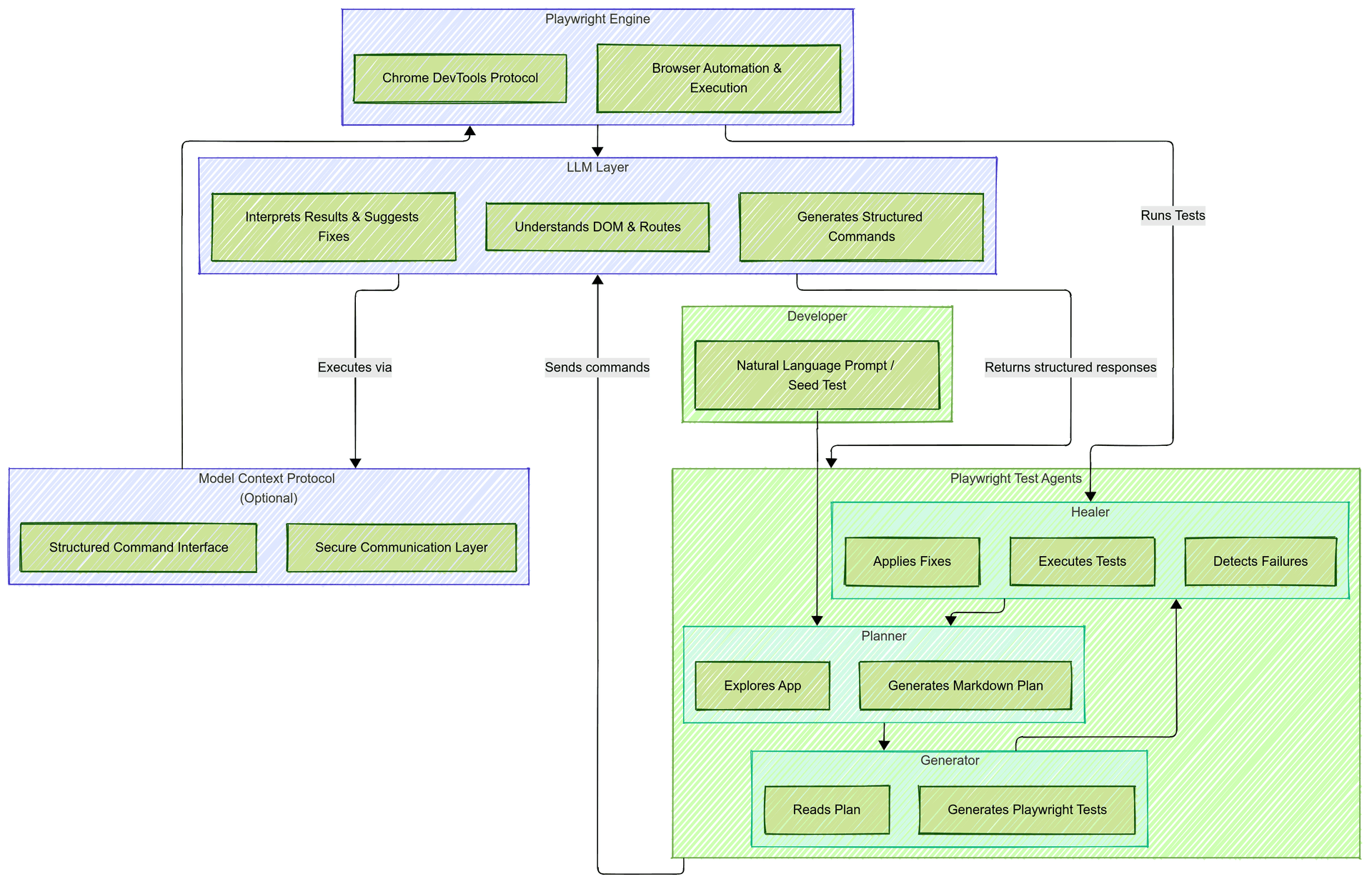
Playwright’s Test Agents work as an orchestrated system with three layers:
-
Playwright Engine handles browser automation using the Chrome DevTools Protocol.
-
LLM Layer uses a large language model (like GPT or Claude) to understand the DOM, routes, and app behavior.
-
Orchestration Loop coordinates these steps, sending structured data to the LLM and receiving outputs that translate to tests.
You can initialize agents in your repo using:
npx playwright init-agents --loop=vscode
This creates configuration and instruction files for each agent. When Playwright updates, re-run the init command to regenerate these definitions. The Playwright CLI supports multiple loop options such as vscode, claude, and opencode for different environments.
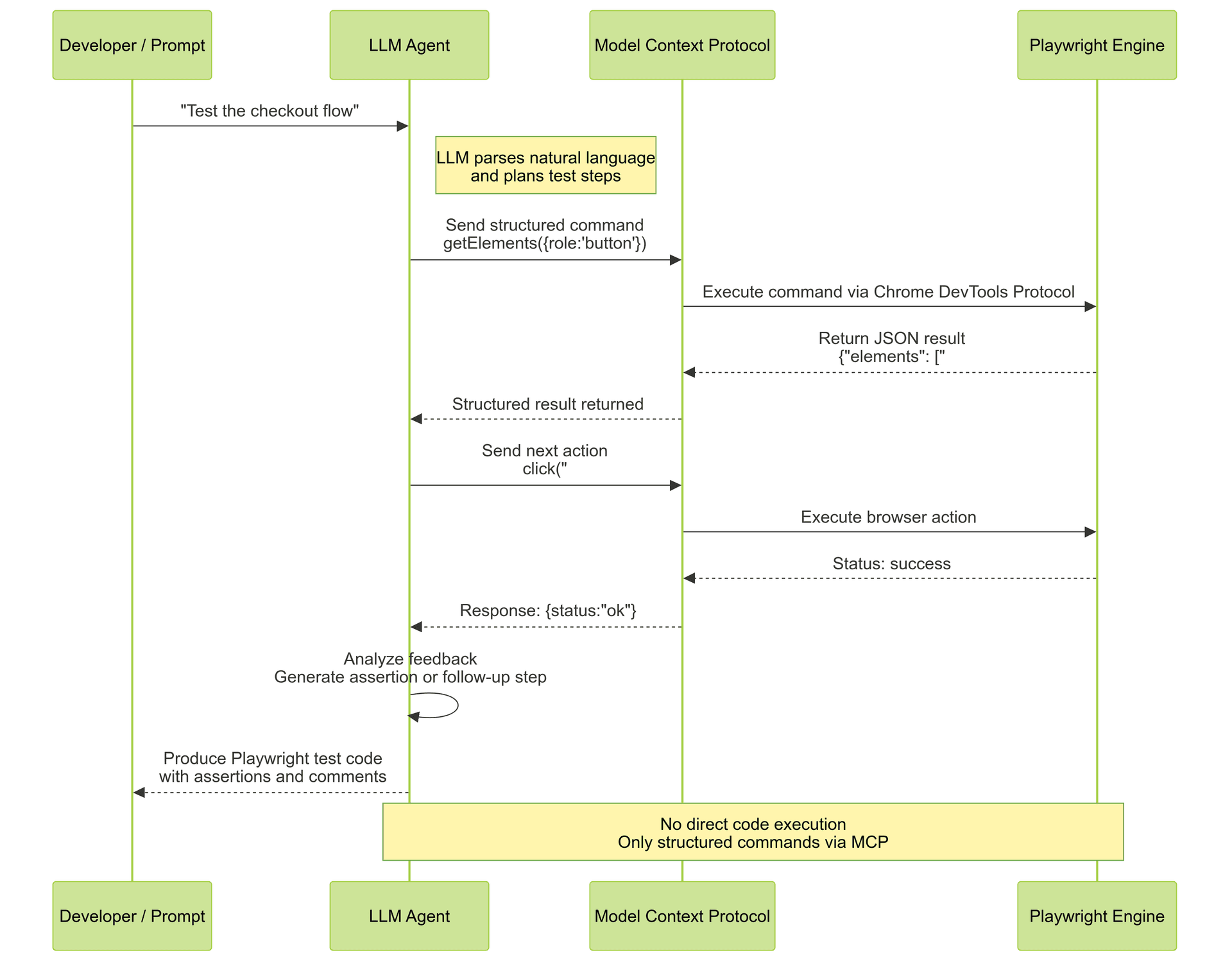
The role of MCP (model context protocol)
Playwright Test Agents run on MCP, the Model Context Protocol, which connects AI models to developer tools safely. For those interested in the technical details, the protocol is open-source and available on GitHub. Playwright 1.59 made this even tighter with browser.bind(), a first-party way for MCP servers and test scripts to share a single browser session.
Here’s how it works:
-
The LLM sends structured commands like
getElements({role: 'button'})orclick(selector).-
Playwright executes them and returns results in JSON.
-
No direct code execution. No security risks.
-
MCP ensures predictable, secure, and auditable communication between Playwright and the model. It also means any LLM that supports MCP can interact with Playwright safely.
The secret sauce in 2026? The Accessibility Object Model (AOM). The most reliable agents don't just parse the DOM or look at screenshots - they read the Accessibility Tree. An agent targeting "Role: button, Name: Checkout" is 10x more stable than one using div.checkout-btn-v3. The shift from DOM-scraping to AOM-reasoning is the hallmark of a high-tier agent. ARIA roles and labels were designed for assistive technology, but they turn out to be perfect for AI agents too.
Why this is a big deal
Playwright Test Agents make testing faster and simpler.
-
They automate test creation.
-
Integrate cleanly with Playwright CLI and runner.
-
Heal broken selectors automatically.
-
Allow faster test coverage growth.
For developers maintaining flaky tests, this is a major improvement.
Multi-modal testing: beyond the DOM
Here's where 2026 gets interesting. Agents aren't just reading the DOM anymore. They're looking at the screen.
Vision models like GPT-4o and Claude can now take a screenshot, understand what they're seeing, and make decisions based on visual context. That modal button with the dynamic class name? The agent doesn't care about the selector. It sees "a confirmation dialog with a red Cancel button and a green Confirm button" and clicks the right one.
This catches things code-based selectors miss entirely. A CSS change that makes your CTA invisible on mobile. A z-index bug that hides your checkout button behind a banner. A font that renders illegibly on certain browsers. DOM-based tests pass. Visual tests fail. The agent sees what your users see.
The tradeoff is speed. Vision model inference is slower and more expensive than DOM parsing. An agentic test that "reasons" through a flow can take 3 minutes where a static script finishes in 10 seconds. Engineering leaders in 2026 care deeply about Time to Feedback - balancing agentic flexibility against execution speed is now a first-class architectural decision. For critical paths where "looks right" matters as much as "works right," multi-modal testing is becoming essential, but you'll want to be selective about where you pay the latency cost.
Multi-agent orchestration
The Planner/Generator/Healer loop is just the beginning. In 2026, teams are running agent teams - multiple specialized agents testing the same flow simultaneously.
Picture a checkout flow. The Functional Agent clicks through the happy path. A Security Agent runs alongside it, probing for XSS vulnerabilities and auth bypasses. An Accessibility Agent checks WCAG compliance at each step. A Performance Agent measures Core Web Vitals. Same user flow, four different test perspectives, running in parallel.
This is where MCP's architecture pays off. Each agent connects to Playwright through MCP, shares the same browser context, and logs to the same trace. You get a unified view of functional correctness, security posture, accessibility compliance, and performance - without maintaining four separate test suites.
The coordination problem is real. Agents can step on each other if they're modifying state. The 2026 solution is the Observer-Driver pattern:
-
Driver Agents own all write-actions and state transitions. They click, fill forms, navigate, and mutate application state. Only one Driver runs per flow to prevent conflicts.
-
Observer Agents run asynchronously to perform specialized audits (Security, Accessibility, Performance) without disrupting the execution flow. They consume the trace stream in real-time, flagging issues as the Driver progresses.
The Driver pushes state changes; observers consume them without causing race conditions. It's still early, but multi-agent testing is how serious teams are getting comprehensive coverage without the combinatorial explosion of traditional test matrices.
The limits
These agents are smart, but not perfect. The 2026 challenges aren't about locators anymore. They're about state.
-
Agentic Workflow State is the hard problem. Your agent can click buttons, but can it handle a test that requires "user with 3 failed payment attempts in the last 24 hours"? Setting up complex database states, managing test data across runs, and resetting to known conditions still requires manual orchestration.
-
Context Window Limits cap how much the agent can "remember." A 50-step checkout flow with dynamic pricing, coupons, and shipping calculations can exceed what the LLM can hold in context. The agent forgets what happened in step 12 by the time it reaches step 40.
-
Reactive Healing fixes after a failure, not proactively. The agent doesn't know your deployment schedule. It can't anticipate that Friday's release will break the selector it just learned.
-
Model Variance means slightly different generated code per run. Two identical requests can produce tests with different assertion styles, variable names, or flow structures.
They understand structure, not meaning. The agents don't truly "get" what your app does, only how it looks and behaves at a snapshot in time.
The death of the locator
This is changing. The 2026 direction is semantic selectors: instead of data-testid="checkout-btn", the agent finds "the primary checkout button" by meaning.
Think about it. When you tell a QA engineer to "click the submit button," they don't ask for a CSS selector. They look at the page, identify the button that submits the form, and click it. Semantic selectors work the same way. The agent understands that a green button labeled "Complete Purchase" at the bottom of a cart page is probably the checkout action, regardless of its id, class, or data-testid.
We're not fully there yet. Semantic selectors are slower, less deterministic, and require more sophisticated models. But for teams tired of updating data-testid attributes every sprint, this is where testing is headed.
How they compare
| Feature | Traditional Playwright | Playwright Agents (2025) | Intent-Based Testing (2026) |
|---|---|---|---|
| Maintenance | Manual, high effort | Semi-auto (Healer) | Zero (autonomous + human review) |
| Setup time | Days to weeks | Hours | Minutes |
| Reliability | Deterministic | Variable (LLM-dependent) | High (human-in-the-loop) |
| UI change tolerance | Breaks on any change | Handles minor changes | Adapts to major changes |
| Token cost | None | Medium to high | Optimized (selective agents) |
| Best for | Stable, critical paths | Growing test suites | Fast-moving products |
The cost of intelligence
Running an agent loop on every PR isn't free. Each healing cycle, each planning step, each code generation pass burns tokens. For a team running 200 PRs a week, that adds up.
The smart play: don't make everything agentic. Keep your stable, high-confidence tests as static Playwright specs. Reserve the agent loop for flaky tests, new features, and areas with frequent UI churn. Some teams we've talked to run agents only on failed tests during a second pass, cutting token spend by 70% while keeping coverage intact.
Watch your CI/CD bill. The agents are capable, but "run agents on everything" is a 2025 mistake you'll regret in 2026.
Here's a 2026 pro-tip most teams learn the hard way: MCP tools have a context tax. Connecting to 5-10 MCP servers can eat 15-20% of your LLM's context window before you send a single command. Tool descriptions, schemas, and capabilities all count against your tokens.
The workaround is "Code Mode." Instead of the agent calling tools directly, it writes code that calls the tools. One code block replaces dozens of tool invocations, and the context overhead drops dramatically. It's less elegant, but it's how teams run complex agent workflows without hitting token limits.
Debugging the agent's brain
When a traditional test fails, you read the error, check the selector, fix the code. When an agent fails, where do you even look?
This is the observability problem. The Planner decided to test the wrong flow. The Generator wrote a selector that works on desktop but breaks on mobile. The Healer "fixed" something that wasn't broken. How do you debug reasoning?
Playwright's answer is agent traces. Every decision the agent makes gets logged: what it saw in the DOM, what it sent to the LLM, what the LLM returned, and what action it took. You can replay the agent's "thought process" step by step.
npx playwright show-trace agent-trace.zip
The trace viewer shows you the agent's context at each decision point. You can see exactly why the Planner chose to test "user login" instead of "user registration," or why the Healer decided to change a selector.
For teams building on agents, this is non-negotiable. Without observability, you're trusting a black box. With it, you can actually improve the agent's behavior over time by adjusting prompts, adding constraints, or flagging certain patterns as off-limits.
This is where the QA role evolves. In 2026, senior QA engineers are becoming AI Supervisors - they don't write scripts, they calibrate agents. The accumulated prompt refinements, constraint rules, and pattern libraries become the team's Institutional Intelligence: the encoded knowledge of what "correct behavior" means for your specific product. When a QA engineer leaves, that intelligence stays in the system.
With the EU AI Act fully applicable by August 2026, these traces aren't just debugging tools - they're compliance documentation. Auditors don't want a pass/fail report; they want to see the Agent's Reasoning Log to verify no algorithmic bias was introduced during the healing phase. The trace viewer becomes your audit trail: proof that human oversight existed, that the agent's decisions were logged, and that you can reproduce exactly what happened. "Human-in-the-loop" isn't just a best practice anymore - for high-risk systems, it's a legal requirement.
The 2026 shift is production-informed testing. Instead of guessing which flows matter, teams feed real user telemetry into the Planner. Logs show that 40% of users abandon checkout at the shipping step? The Planner prioritizes that flow. A new error spike in production? The agent generates regression tests automatically. This is "shift-right" observability: production signals driving test coverage, not the other way around.
The next phase: intent-based testing
The next wave of testing focuses on intent, not structure.
Imagine describing a test in plain English:
“A new user signs up, verifies email, and lands on the dashboard.”
An AI reads it, understands it, and runs the flow even if the UI or wording changes.
No selectors. No code generation. Just goals and outcomes.
This future will combine:
-
Real-time reasoning.
-
Visual and DOM understanding.
-
Context memory for adaptation.
When these combine, testing becomes self-evolving.
Why MCP still matters
If 2025 was about the plumbing (getting MCP to work reliably), 2026 is about the results.
MCP is what makes all of this safe. Without it, you'd have an LLM generating arbitrary code and hoping for the best. With it, you get structured commands, predictable outputs, and an audit trail.
For security-conscious teams, here's what matters: MCP works with local models. You can run Ollama or any self-hosted LLM behind your VPN, and your test data never leaves your infrastructure. No screenshots of your admin panel going to OpenAI. No customer PII in API logs. The protocol doesn't care where the model lives.
This is the 2026 enterprise play. Playwright's MCP model could power future systems where AI observes, reasons, and runs tests from natural language prompts in real time. The protocol is already there, and it works on-prem.
AI compliance and the audit problem
With the EU AI Act in full force and similar regulations spreading globally, 2026 teams face a new question: how do you prove your AI-driven tests are reliable?
The challenge is non-determinism. Run the same agentic test twice, get slightly different results. This is one of the biggest reasons AI testing tools fail in production. For regulated industries (fintech, healthcare, automotive), that's a compliance headache. Auditors want reproducibility. Agents give you variability. The EU's high-risk AI requirements demand logging, human oversight, and documented accuracy metrics - all tricky when your test agent improvises.
MCP helps here. Every command is logged. Every LLM response is recorded. You can replay exactly what the agent "thought" at any point. But the harder problem is algorithmic bias: if your agent consistently misses edge cases that affect certain user groups, how would you even know?
Under NIST's AI Risk Management Framework, auditors in 2026 aren't just asking "did the test pass?" They're asking: "Did your agent skip specific edge cases because of how it interprets UI semantics?" An agent trained on mainstream e-commerce patterns might deprioritize accessibility edge cases or regional payment methods it's never seen. Your automation can develop blind spots without anyone noticing.
The emerging practice is shadow testing: run agentic tests alongside deterministic ones, compare results, and flag divergence. When the agent skips a flow that your scripted tests cover, that's a signal. When it consistently avoids certain UI patterns, that's a potential bias. It's not elegant, but shadow testing is how teams are satisfying compliance requirements while catching the blind spots their agents develop over time.
What engineering leaders are asking
Engineering leaders are asking sharp questions:
-
Is it safe for CI?
Yes. MCP runs locally or behind your firewall.
-
Is it deterministic?
Mostly. Code generation is consistent, healing varies.
-
What about data privacy?
Use self-hosted LLMs or redact sensitive context.
-
Does it replace QA engineers?
No. It complements them. AI automates repetitive work.
-
Is it enterprise-ready?
It’s early but moving fast. Early adopters are shaping this space.
Beyond Playwright: Bug0's approach
The limits above aren't theoretical. We hit every one of them building Bug0.
Agentic Workflow State was our first wall. Playwright Agents can click through a checkout flow, but they can't set up "returning customer with expired subscription and pending refund." We built a state management layer that snapshots and restores database conditions, so agents test real scenarios instead of clean-slate happy paths.
Context Window Limits broke our longest tests. Our fix: hierarchical context compression. The agent summarizes completed steps into condensed checkpoints, keeping recent actions in full detail while older steps become "user logged in and added 3 items to cart." The agent "remembers" the full flow without exceeding token limits.
Model Variance created chaos in our CI. Same test, different assertions, flaky results. We added human-in-the-loop verification. Every healing suggestion gets reviewed before it ships. The Healer can still "hallucinate" a fix that passes the test while breaking business logic (clicking "Cancel" instead of "Submit"), but a human catches it before it reaches production.
The result: teams get coverage fast (100% of critical flows in 7 days, 500+ tests running in under 5 minutes) without the false confidence that comes from fully autonomous systems.
We open sourced the engine behind this. Passmark uses AI for discovery and healing. Playwright for execution. Redis-backed caching so repeat runs cost zero LLM calls. First run takes ~30 seconds per step. Every run after that replays at native Playwright speed. Read why we open sourced it.
Playwright Test Agents vs. other tools
Playwright isn't the only player here. Here's how the agents stack up against the competition:
Playwright Test Agents vs. Stagehand
Stagehand is open-source and combines natural language with Playwright-like primitives (act, extract, observe). It's lower-level than Playwright Agents. You get more control, but you're writing more code. Choose Stagehand if you want to build custom agent behavior. Choose Playwright Agents if you want out-of-the-box planning, generation, and healing.
Playwright Test Agents vs. Browser Use
Browser Use simulates human-like browsing for AI agents. It's designed for automation and data collection, not testing specifically. Playwright Agents are purpose-built for test generation and maintenance. If you're building a web scraper or research agent, Browser Use fits better. If you're building a test suite, Playwright Agents win.
Playwright Test Agents vs. Cypress
Cypress is deterministic, fast, and battle-tested. No AI, no token costs, no variance between runs. Playwright Agents are smarter but less predictable. For stable, critical-path tests that must pass consistently, Cypress (or static Playwright) is still the safer choice. Use agents for exploratory coverage and healing flaky tests.
Playwright Test Agents vs. Applitools
Applitools focuses on visual regression. Playwright Agents focus on functional testing. They solve different problems. If your main pain is "the button moved 2 pixels and now 47 tests are failing," Applitools. If your pain is "I need to generate and maintain 200 functional tests," Playwright Agents.
Other tools worth knowing
No-code options: Reflect, BugBug, and TestRigor let QA teams record actions or write tests in plain English. The tradeoff is flexibility.
Enterprise platforms: Testim, Mabl, and Functionize offer smart locators, self-healing, and natural language test creation with enterprise pricing to match.
Infrastructure: Steel.dev provides low-level browser control with proxy management for large-scale automation.
The takeaway
Playwright Test Agents mark the beginning of AI-assisted testing. They automate the repetitive parts of QA and show what’s possible with structured AI orchestration.
But the future goes further. Real-time, natural language testing will adapt and learn with every product change.
That’s the future we’re building at Bug0.
Book a demo to see what we've built and set up a 30-day pilot.
FAQs
Getting started
What are Playwright Test Agents used for?
Playwright Test Agents automate test planning, code generation, and healing. They help teams quickly create and maintain end-to-end tests without writing repetitive scripts.
How do Playwright Test Agents work?
They use three core roles: the planner creates a test plan, the generator converts it to runnable Playwright code, and the healer fixes broken tests by analyzing UI changes and revalidating locators.
Can I use Playwright Test Agents with my existing projects?
Yes. You can initialize them using npx playwright init-agents, which adds the necessary configuration and folder structure. They can work alongside your current test suites.
Security & enterprise
What is the Model Context Protocol (MCP) in Playwright?
MCP connects AI models with Playwright safely. It sends structured commands to the test runner and ensures that the AI never executes arbitrary code. This makes Playwright's Test Agents secure and auditable.
Are Playwright Test Agents enterprise-ready?
Yes, but it depends. They can be integrated into CI pipelines, run locally or in private environments, and support enterprise use cases. However, large-scale organizations often use AI QA platforms like Bug0 for broader coverage and compliance and human-in-loop determinism in their testing process.
Capabilities & limits
Can Playwright Test Agents handle changing UIs?
They can handle minor changes through the healer, but they still depend on consistent locators and markup. For rapidly evolving UIs, intent-based AI testing is more effective.
Do Playwright Test Agents replace QA engineers?
No. They augment QA teams by automating repetitive workflows. In 2026, the job isn't writing scripts; it's "Calibrating the Agent" - reviewing traces to ensure the AI's logic matches business intent. Human expertise is still critical for defining that intent and catching when the agent's reasoning drifts.
What's next for Playwright Test Agents?
Future versions will likely include better semantic understanding, natural language-driven execution, and tighter integration with AI systems.
Bug0 comparison
How does Bug0 differ from Playwright Test Agents?
Bug0 is Playwright-based under the hood but goes beyond static tests. It uses AI agents to run tests intelligently, adapt to UI changes, and deliver human-verified results at scale. Bug0 offers two products: Bug0 Studio (self-serve, from $250/month) where you describe tests in plain English, and Bug0 Managed (done-for-you QA, from $2,500/month) where a Forward-Deployed Engineer pod handles everything.
How do I get started with Bug0?
Sign up free for Bug0 Studio and create your first test in plain English in 30 seconds. No Playwright expertise required. Tests run on Bug0's cloud infrastructure.