
tldr: Playwright 1.59 ships the Screencast API, browser.bind() for shared browser sessions, CLI debugging for agents, and await using for automatic cleanup. It's the first release designed around AI agents driving the browser, not humans.
The big picture: why this release is "agentic"
Every major feature in Playwright 1.59 solves a problem that surfaces when AI agents, not humans, drive the browser.
Agents need video proof of what they did. They need to share browser sessions across tools. They need CLI-based debugging because they don't have eyes on a GUI. And they need deterministic cleanup because they spawn dozens of pages in a single run.
Previous Playwright releases added pieces of this puzzle. Playwright MCP introduced the protocol bridge. Test Agents added planning and healing. But 1.59 is the release where the infrastructure catches up to the ambition. If you want to understand Playwright's new features in the context of the broader agentic testing trend, this breakdown covers every API change that ships with the 1.59 release.
These are the features that matter, and why.
Screencast API: programmatic video recording
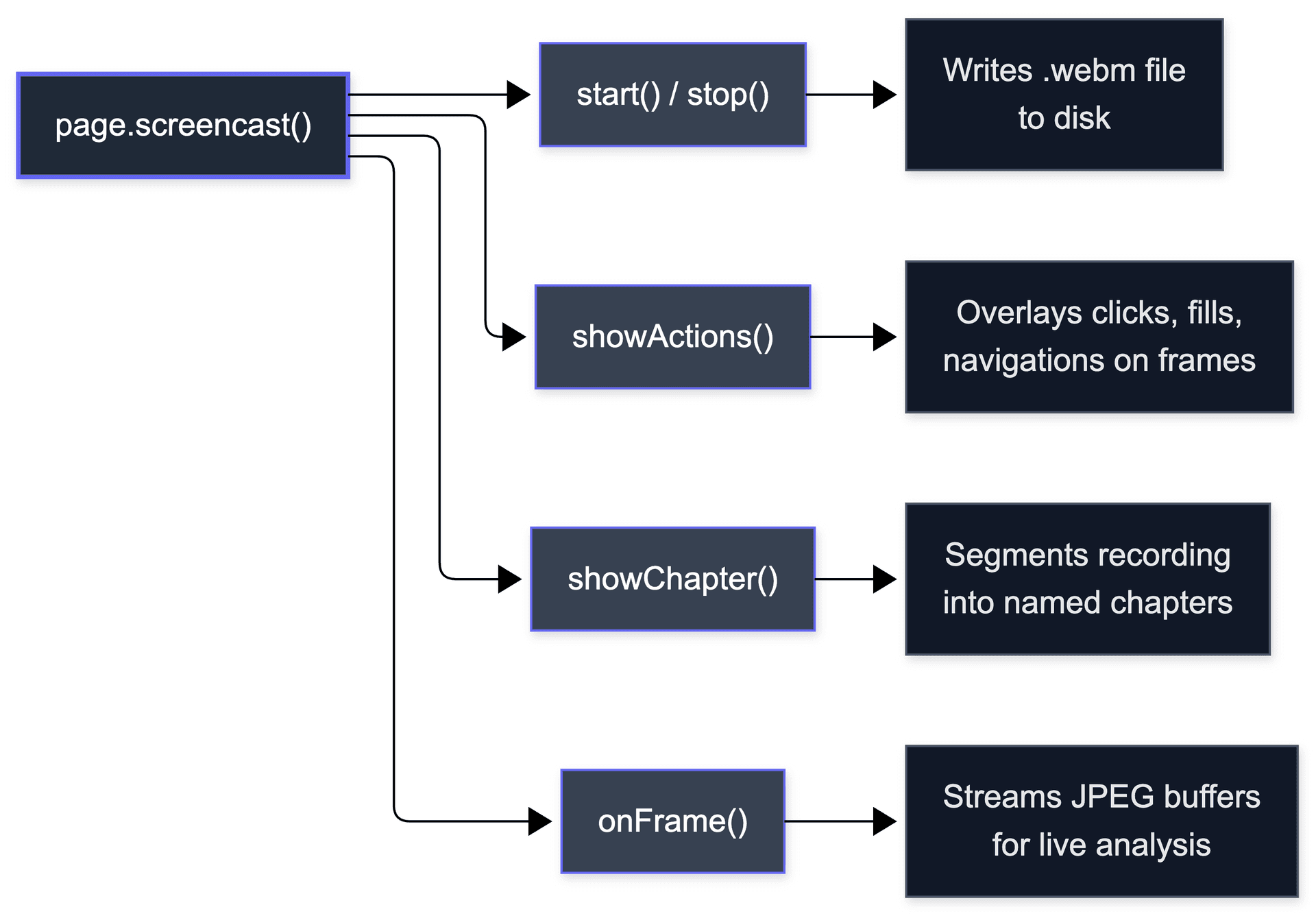
This is the headline feature. The new page.screencast API lets you record browser video with start/stop control, action annotations, and real-time frame capture, all from code.
Basic recording
const screencast = await page.screencast();
screencast.start({ path: 'output/test-run.webm' });

// ...run your test steps...

await screencast.stop();
That's it for simple recording. The annotation APIs are where it gets interesting.
Action annotations with showActions()
When an AI agent clicks a button or fills a form, you want to see exactly what happened in the recording. showActions() overlays each Playwright action directly onto the video frames:
const screencast = await page.screencast();
screencast.start({ path: 'output/annotated-run.webm' });

screencast.showActions(); // overlay clicks, fills, navigations

await page.click('#submit');
await page.fill('#email', 'test@example.com');

await screencast.stop();
The resulting video shows visual indicators at each interaction point. Click targets are highlighted, typed text is shown, and navigations are marked. This turns a raw screen recording into an auditable execution trace.
Chapter overlays with showChapter()
For longer test runs, you can segment the recording into logical chapters:
screencast.showChapter('Login flow');
await page.goto('/login');
await page.fill('#email', 'user@example.com');
await page.fill('#password', 'secret');
await page.click('#submit');

screencast.showChapter('Dashboard verification');
await page.waitForSelector('.dashboard');
await expect(page.locator('.welcome')).toBeVisible();
Each chapter title appears as an overlay in the video. When you scrub through the recording later, you can jump directly to the section you care about.
Real-time frame capture with onFrame
For agents that need to analyze frames during execution (think visual regression or layout verification) the onFrame callback gives you access to each frame as it's captured:
const screencast = await page.screencast();

screencast.onFrame(async (frame) => {
  // frame is a Buffer containing the raw image data
  await analyzeFrameForVisualRegression(frame);
});

screencast.start({ path: 'output/live-analysis.webm' });
This is a building block for real-time visual QA. Instead of comparing screenshots after the run, you can flag anomalies as they happen.
What this replaces
Before the Screencast API, getting video from a Playwright run meant configuring the test runner's built-in video option. A binary on/off with no programmatic control. You couldn't annotate actions, segment chapters, or tap into frames mid-run.
// 1.58 and earlier: config-level, set-and-forget
// playwright.config.ts
use: {
  video: 'on-first-retry',
}

// 1.59: programmatic control with annotations
const screencast = await page.screencast();
screencast.start({ path: 'video.webm' });
screencast.showActions();
screencast.showChapter('Login flow');
// ...your test...
await screencast.stop();
For AI agents, video proof matters. When an agent reports "test passed," stakeholders need evidence. The Screencast API turns every agent run into a self-documenting video with action-level annotations. Teams building AI QA systems (including us at Bug0) have been building custom recording layers on top of Playwright for exactly this purpose. Now the framework ships it natively, which means one less thing to maintain.
CLI debugger and trace analysis for agents
Two new CLI tools make Playwright sessions debuggable without a GUI. Exactly what AI agents need.
CLI debugger: --debug=cli
The traditional Playwright Inspector is a GUI window. That's useless for an agent running in a CI pipeline or a headless container. The new --debug=cli flag provides the same step-through debugging experience over the terminal:
npx playwright test --debug=cli
The CLI debugger lets you:
-
Step through actions one at a time
-
Inspect locators and their matched elements
-
View page state at each step
-
Resume or abort execution
For agent developers, this means you can attach a debugging session to any agent run and step through its actions programmatically.
CLI trace analysis: npx playwright trace
Playwright traces have always been viewable in the Trace Viewer GUI. Now you can analyze them entirely from the command line:
# Open a trace summary
npx playwright trace open trace.zip

# List all actions, filtered by pattern
npx playwright trace actions --grep "click"

# Inspect a specific action by index
npx playwright trace action 9

# View the DOM snapshot after a specific action
npx playwright trace snapshot 9 --name after
Here's what the output looks like in practice:
$ npx playwright trace actions --grep "fail"
[9]   click   button#submit             PASSED  1.2s
[14]  click   button.confirm            PASSED  0.8s
[23]  click   a[href="/dashboard"]      FAILED  timeout after 5000ms

$ npx playwright trace action 23
Action:    click
Selector:  a[href="/dashboard"]
Status:    FAILED
Error:     Element not clickable. Covered by .modal-overlay.
Before:    trace-action-23-before.html
After:     trace-action-23-after.html

$ npx playwright trace snapshot 23 --name before
<overlay class="modal-overlay" style="z-index: 9999">
  ...subscription upsell modal covering viewport...
</overlay>
This is powerful for post-mortem debugging in CI. Instead of downloading a trace file and opening it locally, you can pipe trace analysis into your agent's reasoning loop. An AI agent can run trace actions --grep "fail", find the failing action, inspect the snapshot, and decide on a fix, all without leaving the terminal.
Async disposables: await using
If you've written Playwright scripts that spawn many pages or contexts, you know the cleanup problem. Forget a single await page.close() and you leak a browser tab. Multiply that by an agent running hundreds of iterations, and you have a memory bomb.
Async disposables solve this with await using, a TC39 Stage 3 proposal that TypeScript already supports:
async function runTest() {
  await using page = await context.newPage();
  // page is automatically closed when this scope exits

  await page.goto('/dashboard');
  await expect(page.locator('.widget')).toBeVisible();
  // No explicit page.close() needed
}
Works with routes and init scripts too
await using context = await browser.newContext();

// Route is automatically removed when context is disposed
await using route = await context.route('**/api/**', handler);

// Init script is automatically removed too
await using script = await context.addInitScript(() => {
  window.__test = true;
});
Why this is the most useful feature in the release
For long-running agent loops, deterministic cleanup is non-negotiable. An agent that opens and closes hundreds of pages per hour cannot afford to leak resources. await using guarantees cleanup happens even if an error is thrown mid-execution. It's the kind of language-level guarantee that makes agent code reliable by default rather than by discipline.
Everything else worth knowing
These don't get their own sections, but they'll affect your daily work.
page.ariaSnapshot({ mode: 'ai' }) returns an accessibility tree optimized for LLM consumption. Shorter, more structured, focused on actionable elements. Directly useful for Playwright MCP servers that feed page state into a model.
browserContext.setStorageState() lets you replace cookies, localStorage, and IndexedDB on a live context. Previously you had to create a new context to change auth state. This one line eliminates a lot of context-juggling boilerplate:
await context.setStorageState({
  cookies: [{ name: 'session', value: 'abc123', domain: '.example.com', path: '/' }],
  origins: [{
    origin: 'https://example.com',
    localStorage: [{ name: 'token', value: 'xyz' }]
  }]
});
retain-on-failure-and-retries trace mode keeps traces for both the failing attempt and the passing retry. One config line, big payoff for flaky test debugging:
export default defineConfig({
  use: { trace: 'retain-on-failure-and-retries' },
});
locator.normalize() converts a locator to its canonical form. Useful for deduplication.
browserContext.isClosed() checks context status without try/catch. response.httpVersion() returns "1.1" or "2". tracing.start({ live: true }) streams trace data in real time. UI Mode and HTML reporter got incremental layout and performance improvements.
Observability dashboard (playwright-cli show) lists all bound browser sessions with DevTools access. Useful for staging environments with multiple agents. Set PLAYWRIGHT_DASHBOARD=1 to see @playwright/test browsers too.
Breaking changes and browser versions
Breaking changes
-
Dropped macOS 14 WebKit support. WebKit tests now require macOS 15 or later. If you're running WebKit tests in CI on macOS 14 runners, you'll need to upgrade.
-
Removed
@playwright/experimental-ct-svelte. The experimental Svelte component testing package has been removed. If you were using it, migrate to the standard Playwright test runner with Svelte-specific setup.
Browser versions
| Browser | Version |
|---|---|
| Chromium | 147 |
| Firefox | 148 |
| WebKit | 26.4 |
These are the browser versions bundled with npx playwright install. As always, you can pin specific versions if needed.
Playwright 1.59 vs 1.58: what changed
| Feature | 1.58 | 1.59 |
|---|---|---|
| Video recording | Config-level only | Screencast API with annotations |
| Browser sharing | browserType.connect() | browser.bind() with multi-client |
| Observability | Trace Viewer GUI | Dashboard + CLI trace analysis |
| Agent debugging | GUI Inspector only | CLI debugger (--debug=cli) |
| Resource cleanup | Manual .close() | await using disposables |
| Accessibility snapshots | Standard mode | Standard + AI mode |
| Storage state | Context creation only | setStorageState() on live context |
| Trace retention | retain-on-failure | + retain-on-failure-and-retries |
| macOS WebKit | macOS 14+ | macOS 15+ |
| Svelte CT | Experimental | Removed |
The theme is clear: 1.58 was built for human developers running tests locally. 1.59 is built for agents, pipelines, and multi-tool orchestration.
The MCP interop story nobody is talking about
This is the section you won't find in the release notes or on any other blog. The combination of browser.bind() and @playwright/mcp creates a new architecture for AI-driven testing. And the official docs bury the lede.
The old way (before 1.59)
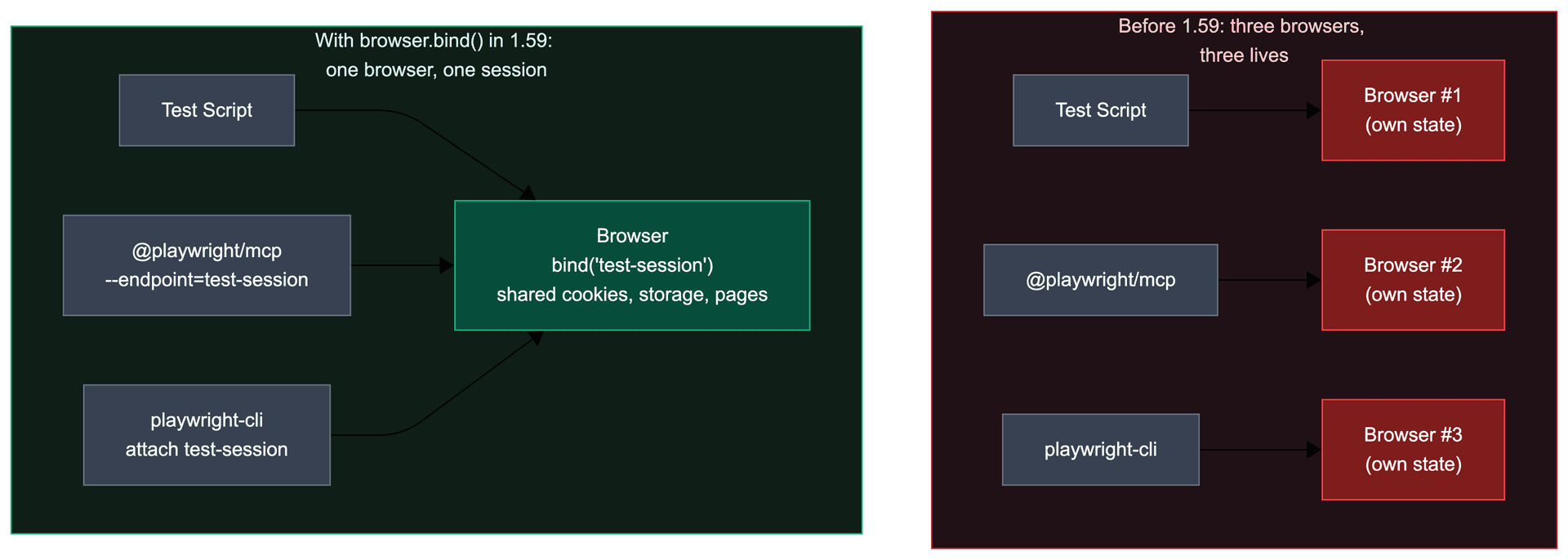
Before browser.bind(), if you wanted an MCP server and a test script to share the same browser, you had two bad options:
Option A: Launch a separate server. Use browserType.launchServer() to start a remote browser, then connect both your test script and MCP via WebSocket. This required version-matching between client and server, and was designed for distributed test execution, not tool interop.
Option B: The CDP port hack. Add --remote-debugging-port=9222 to your launch args, then point MCP at --cdp-endpoint=http://localhost:9222. This worked for Chromium only, was fragile, and broke whenever Chrome changed its CDP implementation. Teams on Playwright MCP issue #1382 documented this workaround extensively. It was never intended as a real integration path.
Both options meant running two separate browser processes. Double the memory. No shared cookies, storage, or page state. If your test script logged into an app, the MCP server couldn't see the authenticated session.
The new way (1.59)
browser.bind() makes any running browser available to @playwright/mcp with a single flag:
// Your test script launches and binds the browser
const browser = await chromium.launch();
const { endpoint } = await browser.bind('test-session', {
  workspaceDir: '/my/project',
});

// Run your test
const page = await browser.newContext().then(c => c.newPage());
await page.goto('https://your-app.com/login');
await page.fill('#email', 'test@example.com');
await page.fill('#password', 'secret');
await page.click('#submit');
// Browser is now authenticated
# In another terminal, MCP connects to the SAME browser
npx @playwright/mcp --endpoint=test-session
The MCP server now sees the authenticated session. An AI agent using the MCP server can inspect the logged-in page, take snapshots, interact with the app, all in the same browser context the test script set up.
You can also attach the CLI for manual debugging:
# Inspect the bound session
npx playwright-cli attach test-session

# Take an accessibility snapshot
npx playwright-cli -s test-session snapshot
The architecture this unlocks
This enables a specific workflow that was previously impossible:
-
Test script sets up state (login, navigate to a specific page, seed data)
-
MCP server connects to the same browser and provides the AI model with page context
-
AI agent reasons about what it sees via MCP, decides what to test next
-
Screencast API records the entire session with annotations
-
CLI trace tools analyze failures after the run
Three clients, one browser, one session. The test script handles deterministic setup. The AI agent handles exploratory testing. The screencast records proof. Before 1.59, you'd need to cobble this together with CDP hacks and separate browser instances. Now it's a first-party API.
For teams building on Playwright MCP, this is the single most useful change in the release.
What to actually do on Monday
Skip the dashboard. Skip pickLocator(). Here's the priority order for adopting 1.59 features:
Week 1: await using everywhere. Search your codebase for page.close(), context.close(), and manual route cleanup. Replace with await using. This is a low-risk, high-reward change. You'll catch resource leaks you didn't know you had.
Week 1: retain-on-failure-and-retries. One line in your config. Immediate payoff the next time a flaky test hits your CI. No reason to wait on this.
Week 2: setStorageState() for auth flows. If you're creating new contexts just to switch between authenticated and unauthenticated states, replace with setStorageState() on your existing context. Fewer contexts means faster tests.
Week 3: browser.bind() + MCP (if you're building agentic workflows). This is the big one. See the MCP interop section above for the full architecture. Don't bolt it onto an existing test suite. Start with a new exploratory testing setup where your test script handles login and state setup, and an MCP-connected agent handles the actual testing.
Later: Screencast API. Only adopt this if you need video proof of test runs with action-level annotations. If your current recordVideo config works fine, there's no urgency to switch. The Screencast API is more powerful but also more code to maintain.
What's overhyped, what's underrated
Most "what's new" posts treat every feature equally. They shouldn't. Here's an honest ranking.
Overhyped: the observability dashboard. It looks good in screenshots. In practice, you won't use it much. If you're running agents in CI, there's no one watching a dashboard. If you're running locally, you already have DevTools open. The dashboard fills a narrow gap: teams running multiple bound sessions in a staging environment who want a bird's-eye view. That's a real use case, but it's not most teams.
Overhyped: page.pickLocator(). It's an interactive element picker. Useful for tooling builders. Most test authors will never call it directly.
Underrated: await using. This will save more engineering hours than any other feature in the release. Every Playwright codebase has cleanup bugs. Contexts that aren't closed. Routes that accumulate. Init scripts that pile up. await using fixes all of this with zero behavior changes to your existing code. Just wrap your declarations and forget about cleanup. If you do nothing else from this release, adopt await using.
Underrated: retain-on-failure-and-retries. Flaky test debugging is one of the biggest time sinks in test automation. Previously, when a test failed on attempt 1 but passed on retry, the failing trace was discarded. You'd see "passed on retry" in your report with no way to investigate why it failed initially. This trace mode keeps both. Small change, huge impact.
The real headline: browser.bind() + MCP. The Screencast API gets the marketing. But browser.bind() is the architectural change. It turns Playwright from a testing tool into a browser platform that multiple AI tools can share. The implications for Playwright test agents and MCP-based workflows are substantial.
What to expect when you upgrade
Every "what's new" post tells you what shipped. None of them tell you what breaks in practice. Here's what to watch for.
macOS 14 WebKit runners will fail silently. If your CI uses macOS 14 (Sonoma) runners for WebKit tests, those tests will fail after upgrading. The error message isn't always clear. You need macOS 15 (Sequoia) runners. If your CI provider doesn't offer them yet, pin WebKit tests to Playwright 1.58 and upgrade everything else.
Screencast API vs existing recordVideo config. If you already have recordVideo in your browser context options, adding the Screencast API alongside it can produce conflicts. The two systems are independent. If you adopt the Screencast API, remove your recordVideo config to avoid recording the same session twice (and doubling your artifact storage).
await using requires TypeScript 5.2+. The using declaration is a TC39 Stage 3 proposal. TypeScript supports it from 5.2 onward. If you're on an older TypeScript version, the syntax won't compile. Check your tsconfig.json target. You need ES2022 or later, or ESNext.
Browser binary sizes increased. Chromium 147, Firefox 148, and WebKit 26.4 are all larger than their predecessors. If you cache browser binaries in CI, your cache key will miss. Playwright's official advice is to not cache browsers at all (restore time roughly equals download time), but if you do, update your cache keys.
What came after 1.59
1.59 was not the last word. Two releases shipped after it.
Playwright 1.60 added locator.drop() for real external drag-and-drop, test.abort() for stopping a test from a hook, page-level aria snapshots, and first-class HAR capture on tracing.
Playwright 1.61 is the current stable. It adds a WebAuthn virtual authenticator for testing passkeys, a direct page.localStorage API, and video retention modes for flaky tests. We break both down in what's new in Playwright 1.61.
For the official changelog, see the Playwright release notes.
FAQs
What are the new features in Playwright 1.59?
The major additions are the Screencast API for programmatic video recording, browser.bind() for shared browser sessions, a CLI debugger (--debug=cli) for agent workflows, CLI trace analysis (npx playwright trace), async disposables (await using), AI-optimized accessibility snapshots, and browserContext.setStorageState(). See the Playwright 1.59 release notes for the full changelog. 1.59 shipped in April 2026; the latest stable is now Playwright 1.61.
Is Playwright 1.59 still the latest version?
No. 1.59 shipped in April 2026. Playwright 1.60 and 1.61 have shipped since, and 1.61 is the current stable. See what's new in Playwright 1.61 for the newer features.
How do I upgrade to Playwright 1.59?
Run the following commands to upgrade Playwright and install the latest browser binaries:
npm install -D @playwright/test@latest
npx playwright install
If you're using Yarn:
yarn add -D @playwright/test@latest
npx playwright install
After upgrading, run your test suite to verify compatibility. The official release notes document every change.
Is Playwright 1.59 backwards compatible?
Mostly yes. The two breaking changes are the removal of macOS 14 WebKit support and the removal of @playwright/experimental-ct-svelte. If you don't use either of those, the upgrade should be smooth. All new APIs are additive. Existing tests will continue to work without modification.
What browsers does Playwright 1.59 support?
Playwright 1.59 bundles Chromium 147, Firefox 148, and WebKit 26.4. It supports Windows, macOS 15+, and Ubuntu 22.04+ for all three browsers. WebKit on macOS now requires macOS 15 (Sequoia) or later.
What is the Playwright Screencast API?
The Screencast API (page.screencast) is a programmatic video recording interface introduced in Playwright 1.59. It lets you start and stop recording, annotate actions with visual overlays via showActions(), segment recordings into chapters with showChapter(), and capture frames in real time with onFrame. It replaces the config-level video recording option with a fully controllable API.
What is browser.bind() in Playwright?
browser.bind(title, options?) exposes a running browser instance over a named pipe (default) or WebSocket (host/port options), allowing multiple clients to connect simultaneously. Your test script, an MCP server, and the CLI can all share one browser session. The title is a human-readable session name, like 'test-session'. Call browser.unbind() to stop accepting connections. See the MCP interop section above for the full architecture.
Can AI agents use Playwright 1.59?
Yes, and that's the core design intent of this release. The CLI debugger (--debug=cli) works in headless environments. The Screencast API provides video proof without GUI dependencies. browser.bind() enables multi-tool orchestration. And the AI-optimized ariaSnapshot({ mode: 'ai' }) gives LLMs structured page state. Playwright 1.59 is the most agent-compatible release to date.
Can I use browser.bind() with @playwright/mcp?
Yes. This is one of the most useful combinations in the release. Call browser.bind('my-session') in your script, then start MCP with npx @playwright/mcp --endpoint=my-session. The MCP server connects to the same browser instance your script is driving. Multiple clients can connect simultaneously. See the MCP interop section above for the full walkthrough.
Does await using work with JavaScript (not TypeScript)?
Not yet in most runtimes. The using declaration is a TC39 Stage 3 proposal. TypeScript 5.2+ supports it. Node.js has experimental support behind a flag. If you're writing plain JavaScript, you'll need to stick with explicit .close() calls for now, or use a try/finally pattern.