
tldr: An emulator is software that makes one computer behave like another by replicating its hardware and software environment. The concept is fifty years old. The misunderstanding is fresh: most teams in 2026 treat emulators as a cheaper substitute for real devices. They're not. Emulators answer a different question than real devices do, and confusing the two is how notification bugs, performance regressions, and OEM-specific crashes ship to production every quarter.
The shortest honest definition of Emulator
An emulator is software (or hardware) that enables one computer system, the host, to behave like another computer system, the guest. The host runs software designed for the guest without modification.
That's the Wikipedia definition, and it's accurate. But it's also incomplete for anyone building software in 2026, because it doesn't tell you what an emulator can't do.
Let me give you an example most developers have touched. The Android Emulator in Android Studio creates a virtual Android phone on your laptop. It replicates the CPU architecture, memory model, GPU behaviour, and operating system. You can install your APK, tap through your UI, watch logs, and debug breakpoints. It feels like a phone.
It is not a phone. And the gap between "feels like" and "is" costs teams real money.
How an emulator actually works under the hood
This is worth understanding because the architecture explains the limitations.
An emulator has to solve one core problem: the guest system's instructions don't run natively on the host. The emulator translates them.
When host and guest share an architecture, it's fast. The Android Emulator on an x86 laptop running an x86 Android system image uses hardware-accelerated virtualization:
-
Linux: KVM (Kernel-based Virtual Machine)
-
Windows: WHPX (Windows Hypervisor Platform)
-
macOS: Hypervisor.Framework
The guest OS runs at near-native speed because the CPU instructions don't need translation. Most developers never look at this setting, which is fine until a test passes locally on an x86 image and fails in CI on an ARM image, and nobody can explain why.
Intel's HAXM used to handle this, but Intel discontinued HAXM development in January 2023. Google now recommends KVM on Linux, WHPX on Windows, and Hypervisor.Framework on macOS, with AEHD as the new Windows alternative.
When architectures differ, you pay a tax. Running an ARM Android image on an x86 host requires translating every ARM instruction to x86. Before Android 11, this meant full system-level ARM emulation. Performance was painful.
Google fixed this with a per-process translation approach in the Android 11 system images:
"The new Android 11 system images are capable of translating ARM instructions to x86 without impacting the entire system. This allows the execution of ARM binaries for testing without the performance overhead of full ARM emulation."
"When an app's process requires an ARM binary, the binary is translated to x86 within that process exclusively. This allows the rest of the process to continue executing in x86, including the Android Runtime (ART), and other performance-critical libraries."
Focus: within that process exclusively.
Only the ARM-dependent process pays the translation cost. Everything else runs x86 natively with full hardware acceleration. That isolation is what made the Android Emulator usable for ARM-dependent apps without a physical device.
Here is the mental model worth carrying forward:
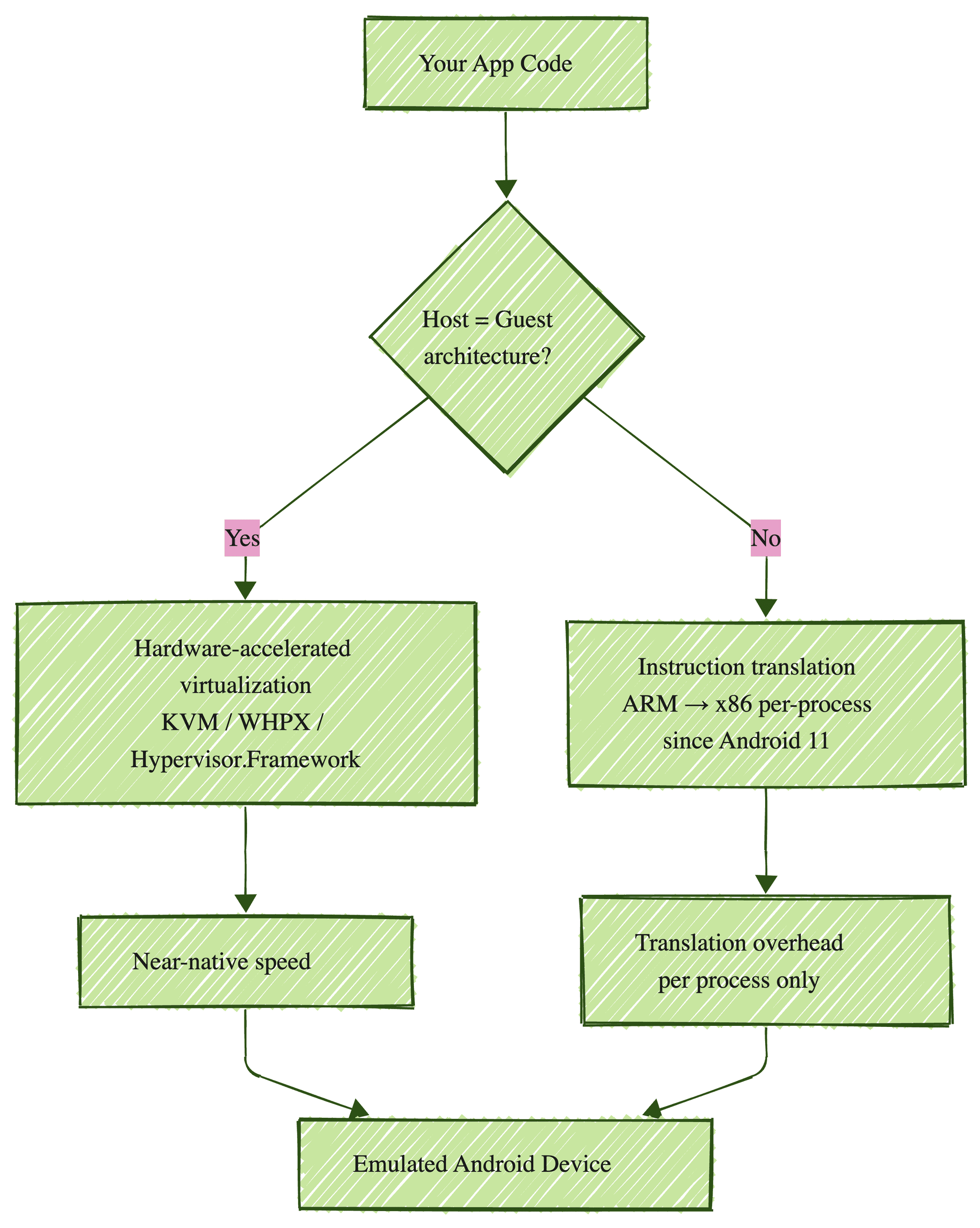
That architecture diagram matters because it tells you exactly where emulators are strong (functional testing of app logic at native speed) and where they break down (anything that depends on real hardware behaviour the emulator doesn't model).
The four types of emulators that actually matter
Most "types of emulators" lists give you twelve categories. I think four carry the weight.
| Type | What it replicates | Example | When you'd use it |
|---|---|---|---|
| Mobile device emulator | Phone/tablet hardware + OS | Android Emulator (Android Studio) | App development, functional testing, CI regression |
| Game console emulator | Console hardware + firmware | RetroArch, Dolphin, PCSX2 | Playing classic games on modern hardware |
| OS emulator | Full computing environment | QEMU, VirtualBox, VMware | Running a different OS inside your current one |
| Terminal emulator | Text-based interface | iTerm2, Windows Terminal, PuTTY | SSH sessions, command-line work |
Let me be clear about something: the gaming emulator world and the software testing emulator world share a name and almost nothing else. RetroArch replicating a Super Nintendo and Android Studio replicating a Pixel 9 are solving fundamentally different problems, with different architectures, different accuracy requirements, and different failure modes.
Most confusion about "what is an emulator" comes from conflating these two worlds. A game emulator needs cycle-accurate hardware reproduction to avoid glitches in 30-year-old software. A mobile testing emulator needs API-level fidelity to run your app correctly. Different problems. Different engineering.
Emulator vs simulator: the distinction that actually matters
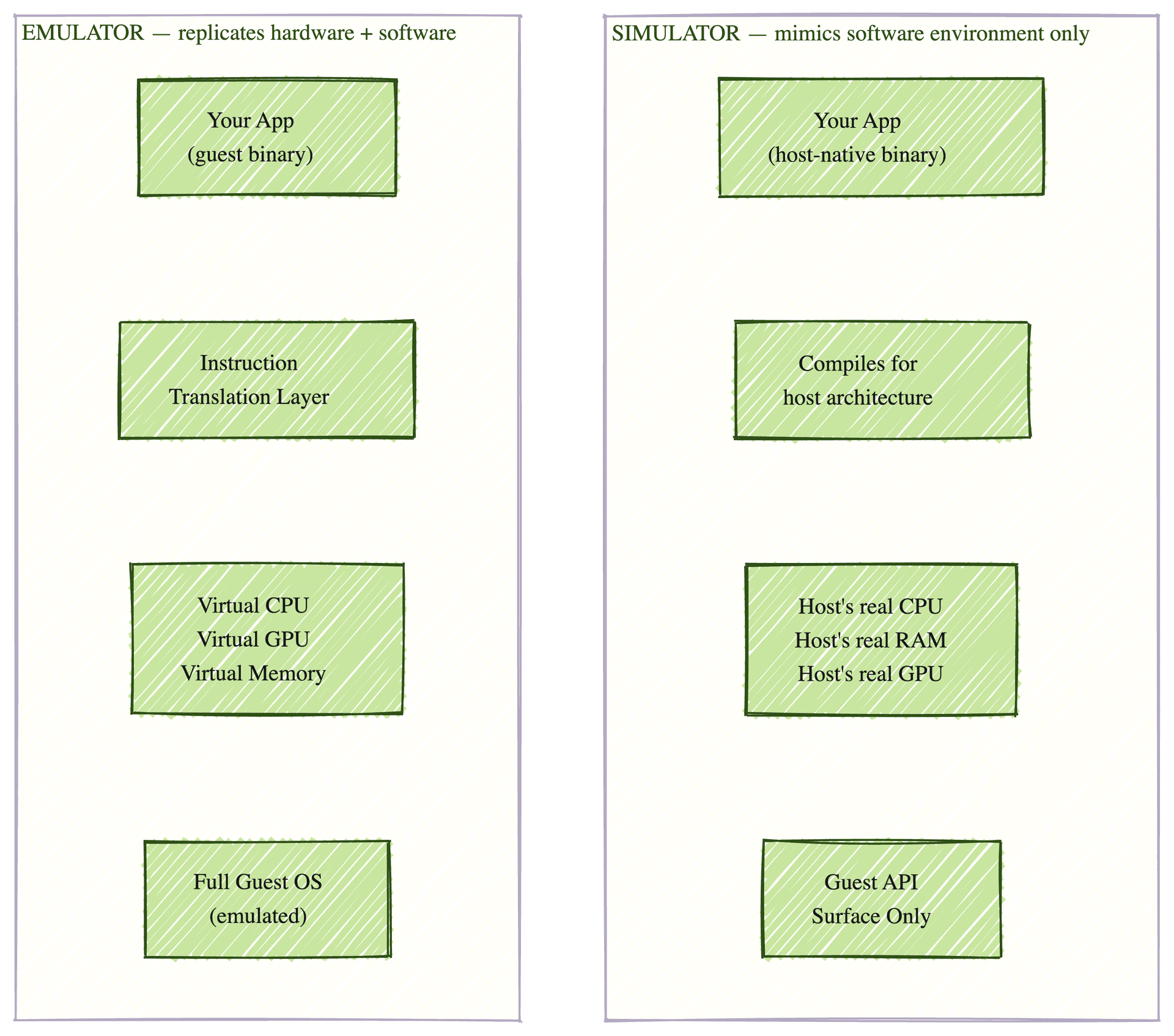
This is the question right underneath "what is an emulator" in every developer's head, so let me address it directly.
An emulator replicates hardware and software. The Android Emulator models the CPU, GPU, memory, and OS of the target device. It translates instructions at the hardware level.
A simulator mimics only the software environment. Apple's iOS Simulator, bundled with Xcode, does not emulate the iPhone's ARM chip. Your Swift code compiles for your Mac's native architecture. On Apple Silicon Macs, it compiles to ARM64, but it's your Mac's ARM64, not the iPhone's.
This has practical consequences that most teams underestimate:
| Property | Emulator (Android) | Simulator (iOS) |
|---|---|---|
| Architecture | Can translate guest instructions (ARM on x86) | Compiles natively for host architecture |
| Speed | Near-native with HW acceleration, slower with translation | Fast, no translation overhead |
| Memory model | Configurable per AVD | Shares host Mac's RAM pool |
| Hardware sensors | Simulated (GPS, accelerometer) | Faked or absent |
| Push notifications | Works via FCM on Google APIs images | Different delivery path than physical device |
| OS fidelity | Stock Android only, no OEM skins | iOS APIs faithfully represented |
Here is the opinion worth landing clearly: the simulator is faster. The emulator is more faithful. Neither one is a real device, and the failure modes they miss are different failure modes.
The iOS Simulator shares your Mac's 18 or 36 GB of RAM. An iPhone 15 has 6 GB. A memory warning that would fire on the phone never fires in the simulator. If you're profiling memory behaviour on a simulator, the simulator is lying to you. This is the single most common false-confidence moment in iOS development.
The Android Emulator runs stock Android with Google APIs. It does not run Samsung's One UI, Xiaomi's HyperOS, OnePlus OxygenOS, or any other manufacturer skin. Samsung held 22% global smartphone market share in Q1 2026, per Omdia, which means a fifth of your Android users are on a device the emulator can't model. Their notification behaviour, background process rules, and permission dialogs are all different from what your emulator shows you.
What an emulator actually catches (and what it can't)
This is where the real confusion lives. Teams treat the emulator as a cheap real device. It's not a cheap real device. It's a fast, controlled environment for a specific category of tests.
Let me map it out.
What emulators catch well:
-
Functional correctness. Does the login work? Does the checkout calculate the right total? These bugs live in your application code, not in device hardware. Emulators are the right surface. Fast, repeatable, CI-friendly.
-
UI layout at standard screen sizes. Emulators support configurable dimensions and pixel densities. For layout regression, they're sufficient.
-
API-level behaviour. Network calls, database operations, state management. All testable in an emulator because they depend on your code, not on device hardware.
-
Early-stage development iteration. Hot reload, breakpoint debugging, log inspection. This is where emulators earn their keep every day.
What emulators miss:
-
OEM-specific behaviour. Samsung's background process killing. Xiaomi's battery optimization. OnePlus's permission flow. None of this exists in the emulator.
-
Real hardware sensors. Cameras, fingerprint readers, NFC, Bluetooth, gyroscopes, barometers. Absent or faked.
-
Performance under real constraints. Your MacBook Pro will never reproduce a memory warning that fires at 4 GB on a mid-range Android phone. Performance numbers from an emulator describe your laptop, not your user's phone.
-
Push notification delivery in production conditions. The Android Emulator can receive notifications via FCM on Google APIs images. But real delivery interacts with Doze mode, OEM background restrictions, and carrier throttling.
-
Real network conditions. Your dev machine is on gigabit Wi-Fi. Your user is in an elevator on 3G with 400ms latency. Throttling tools approximate bad networks. They can't replicate radio state transitions and carrier-specific throttling.
I think OEM-specific behaviour is the single most under-tested surface in mobile QA in 2026. The emulator creates a false sense of coverage because it looks complete. Green CI, high coverage numbers, clean screenshots. But the coverage is for stock Android, and stock Android is not what most of your users run.
Here is the frame worth holding: an emulator answers "does my code work?" A real device answers "does my code work for this user on this phone?" Different questions. Different surfaces. Choosing between them based on cost is how bugs ship.
Why "just use emulators for everything" is the most expensive mistake in mobile QA
Let me walk you through two versions of this mistake.
Version one: everything on emulators. CI is green. Functional tests pass. The layout looks clean across four screen sizes. Then, a customer on a Xiaomi Redmi Note in India reports that notifications stop arriving after 30 minutes. The emulator never caught this because it runs stock Android without Xiaomi's HyperOS battery optimisation.
Version two: everything on real devices. Every test runs on 20 real devices. CI takes 45 minutes instead of 8. Most failures are infrastructure flakes, not app bugs. The team is paying for real-device minutes to run functional tests that would have passed identically on an emulator in a quarter of the time.
Both approaches waste money. Both miss bugs.
The fix is matching the test type to the surface:
| Test type | Best surface | Why |
|---|---|---|
| Functional regression | Emulator | Bugs live in the code, not the device |
| UI layout (standard sizes) | Emulator | Screen dimensions are configurable |
| Performance profiling | Real device | Your laptop's resources ≠ user's phone |
| Push notification delivery | Real device (OEM-specific) | OEM battery optimisation rules don't exist in emulators |
| OEM-specific behaviour | Real device | One UI, HyperOS, and OxygenOS aren't in the emulator |
| Hardware sensors | Real device | Camera, NFC, Bluetooth: no virtual equivalent |
For teams building a testing strategy in 2026, this surface-matching is the decision that actually matters, not "emulator or real device" as a binary. On mobile-native, real-device clouds are still the answer. On the web side of your stack, AI-native QA services like Bug0 own the regression surface end-to-end for teams shipping daily without a QA hire.
The question "what is an emulator" is the starting point. The question that matters for your release quality is "which surface catches the bug my user is about to hit." That second question is harder, and it changes every time your user base shifts.
How to set up the Android Emulator (quick reference)
Since this is a "what is an emulator" piece, here is the practical setup for the emulator most developers encounter first.
Step 1: Install Android Studio. The Android Emulator bundles with it.
Step 2: Open AVD Manager. Tools → Device Manager → Create Virtual Device.
Step 3: Pick a device profile. Pixel 9, Pixel 7a, or a generic phone profile. This sets screen size, resolution, and hardware config.
Step 4: Choose a system image. Three options matter:
| Image type | Includes | Best for |
|---|---|---|
| Google APIs | Android OS + Google services (Maps, FCM) | Testing apps that use Google APIs, push notifications |
| Google Play | Google APIs + Play Store | Testing in-app purchases, Play Store flows |
| ATD (Automated Test Device) | Stripped OS, no user-facing apps | Headless CI testing, lower resource usage |
ATD images, available since Android 11, are optimised for headless automated testing. If you're running functional regression in CI, use ATD images. They reduce CPU and memory usage on your runners.
Step 5: Configure and launch. Set RAM, internal storage, SD card. Click Play. The emulator boots in seconds on hardware-accelerated images.
One thing worth knowing: the emulator's snapshot feature saves the entire device state. Cold boot takes 30-60 seconds. Snapshot restore takes 2-5 seconds. Use snapshots in CI for faster test cycles. Over a week of CI runs, this one setting saves hours. Most teams skip it.
Are emulators legal? Are they safe?
Two questions that surface on every "what is an emulator" search.
Legality. Emulators themselves are legal. The Android Emulator ships with Android Studio. The iOS Simulator ships with Xcode. QEMU is open-source. RetroArch is open-source. Creating software that replicates hardware is not illegal. The legality question is a distraction from the real question, which is whether you're using the emulator for the right tests.
What gets legally complicated is the content: ROMs, BIOS files, and copyrighted game software. Downloading copyrighted game ROMs you don't own is illegal in most jurisdictions. Using emulators with software you've legally purchased or developed yourself is fine.
Safety. Official emulators from Google, Apple, and established open-source projects are safe. Risk comes from downloading third-party emulators from unverified sources, or loading APKs and ROMs from untrusted sites. Stick to official tools.
FAQs
What is an emulator in simple terms?
A program that makes one computer behave like another. It replicates the target system's processor, memory, and OS so software built for the target runs on the host without modification. The Android Emulator makes your laptop behave like an Android phone. RetroArch makes your PC behave like a Super Nintendo.
How does an emulator work?
It translates the guest system's instructions so the host system can execute them. When host and guest share the same architecture (x86 laptop running x86 Android image), hardware-accelerated virtualisation handles it at near-native speed. When architectures differ (ARM Android image on x86 host), per-process instruction translation kicks in. Android 11 introduced per-process ARM-to-x86 translation that isolates the overhead to specific processes. The architecture section above covers this in detail, and it's worth understanding because it explains most of the performance surprises teams hit in CI.
What is the difference between an emulator and a simulator?
An emulator replicates both the hardware and software of the target system. A simulator mimics only the software environment, compiling code natively for the host. The Android Emulator translates ARM instructions. The iOS Simulator compiles your Swift code for your Mac's processor. Emulators are more faithful to device behaviour. Simulators are faster.
Are emulators safe?
Official emulators from Google (Android Emulator), Apple (iOS Simulator), and established open-source projects are safe. Risk comes from downloading emulators from unverified sources or loading APKs and ROMs from untrusted sites.
Can an emulator replace real device testing?
No, and this is the hill I'll stand on. Emulators catch functional bugs, layout issues at standard sizes, and API-level behaviour. They miss OEM-specific Android behaviour (Samsung One UI, Xiaomi HyperOS), real hardware sensor interaction, performance under real memory and battery constraints, and push notification delivery under production conditions. Real devices answer questions emulators can't. Treating them as interchangeable is how notification bugs ship.
What is the Android Emulator?
A software tool bundled with Android Studio that creates Android Virtual Devices (AVDs) on your development machine. It replicates the CPU architecture, memory, GPU, and Android OS of the target device. Supports hardware acceleration via KVM (Linux), WHPX (Windows), and Hypervisor.Framework (macOS).