tldr: Sharding splits your Playwright test suite across multiple CI machines so they run in parallel. A 60-minute suite becomes 8 minutes with the right setup. This guide gives you copy-paste CI configs for GitHub Actions, GitLab CI, CircleCI, and Azure Pipelines, plus the pitfalls that will waste your afternoon if you don't know about them.
Your Playwright test suite started at 5 minutes. Then you added more tests. Then more browsers. Now it takes 60 minutes, your developers are alt-tabbing during CI, and your deploy frequency has quietly dropped from 10 times a day to twice.
Test sharding is how you fix this. Not by writing fewer tests or buying a bigger machine, but by splitting your suite across multiple CI machines that run simultaneously.
Playwright has built-in sharding support. The CI platforms you already use support it natively. The setup takes 20 minutes. This guide walks you through all of it.
What is Playwright test sharding?
Sharding means dividing your test suite into chunks and running each chunk on a separate CI machine at the same time. If you have 400 tests and 4 machines, each machine runs roughly 100 tests.
If you've heard the term playwright parallel testing but aren't sure how it differs from workers, this guide covers both.
Playwright's sharding is controlled by a single CLI flag:
npx playwright test --shard=1/4
npx playwright test --shard=2/4
npx playwright test --shard=3/4
npx playwright test --shard=4/4
The first number is the shard index (which chunk to run). The second is the total shard count (how many chunks to split into). Each command runs on a different CI machine.
How Playwright splits tests depends on one config option:
-
Without
fullyParallel: true: Playwright assigns entire test files to shards. If one file has 80 tests and another has 5, you get imbalanced shards. -
With
fullyParallel: true: Playwright distributes individual tests across shards. This is what you want. It produces balanced shards regardless of how your files are organized.
One important thing to understand: Playwright splits by test count, not execution time. A shard with 100 fast unit-style tests will finish before a shard with 100 slow integration tests, even though both have the same count. We'll address this later.
Workers vs sharding: know the difference
Before you add sharding, make sure you've already optimized workers. They solve different problems and stack together.
| Dimension | Workers | Sharding |
|---|---|---|
| Scale | Vertical (CPU cores on one machine) | Horizontal (multiple machines) |
| Setup | Config change in playwright.config.ts | CI pipeline changes |
| Load balancing | Dynamic (Playwright assigns tests as workers free up) | Static (alphabetical split by test count) |
| Cost | Single machine | Multiple machines (parallel CI minutes) |
| Sweet spot | Less than 800 tests, under 20 minutes | 500+ tests, over 30 minutes |
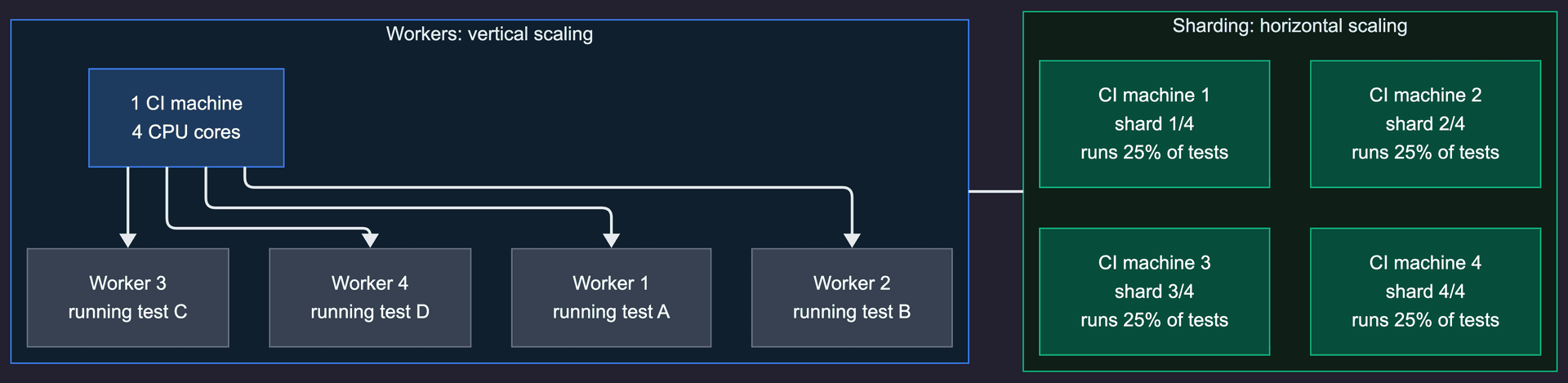
Workers run tests in parallel across CPU cores on a single machine. Set them in your config:
// playwright.config.ts
export default defineConfig({
  workers: process.env.CI ? 4 : undefined,
  fullyParallel: true,
});
Sharding runs tests in parallel across multiple machines. Each machine can also use multiple workers.
The recommended approach: 4-8 workers per machine + sharding across machines. This maxes out vertical scaling before adding horizontal scaling. Don't jump to 16 shards when you haven't tried 4 workers on a single machine first.
Setting up basic sharding
Before wiring up your CI, verify sharding works locally:
# Run shard 1 of 4
npx playwright test --shard=1/4

# Run shard 2 of 4
npx playwright test --shard=2/4
Each command should run roughly 25% of your tests. If the split looks wildly uneven, you probably don't have fullyParallel: true in your config.
Update your playwright.config.ts for CI:
import { defineConfig } from '@playwright/test';

export default defineConfig({
  fullyParallel: true,
  workers: process.env.CI ? 4 : undefined,
  retries: process.env.CI ? 2 : 0,
  reporter: process.env.CI ? 'blob' : 'html',
});
Two things to note here. The blob reporter is critical for sharding. It produces a binary report file that can be merged later. Without it, you only see the results from the last shard that ran. We'll cover report merging in its own section below.
The workers: 4 setting gives each shard machine 4 parallel workers. Adjust based on your CI runner's CPU count. GitHub Actions runners have 2 vCPUs, so 2-4 workers is the sweet spot. GitLab shared runners vary.
GitHub Actions
GitHub Actions is the most common CI for Playwright sharding. Here is the full config:
name: Playwright Tests
on:
  push:
    branches: [main]
  pull_request:
    branches: [main]

jobs:
  test:
    timeout-minutes: 30
    runs-on: ubuntu-latest
    strategy:
      fail-fast: false
      matrix:
        shardIndex: [1, 2, 3, 4]
        shardTotal: [4]
    steps:
      - uses: actions/checkout@v4

      - uses: actions/setup-node@v4
        with:
          node-version: 20

      - name: Install dependencies
        run: npm ci

      - name: Install Playwright browsers
        run: npx playwright install --with-deps

      - name: Run Playwright tests
        run: npx playwright test --shard=${{ matrix.shardIndex }}/${{ matrix.shardTotal }}

      - name: Upload blob report
        if: ${{ !cancelled() }}
        uses: actions/upload-artifact@v4
        with:
          name: blob-report-${{ matrix.shardIndex }}
          path: blob-report
          retention-days: 1

  merge-reports:
    if: ${{ !cancelled() }}
    needs: [test]
    runs-on: ubuntu-latest
    steps:
      - uses: actions/checkout@v4

      - uses: actions/setup-node@v4
        with:
          node-version: 20

      - name: Install dependencies
        run: npm ci

      - name: Download blob reports
        uses: actions/download-artifact@v4
        with:
          path: all-blob-reports
          pattern: blob-report-*
          merge-multiple: true

      - name: Merge reports
        run: npx playwright merge-reports --reporter html ./all-blob-reports

      - name: Upload HTML report
        uses: actions/upload-artifact@v4
        with:
          name: html-report--attempt-${{ github.run_attempt }}
          path: playwright-report
          retention-days: 14
Key details:
-
fail-fast: falseis essential. Without it, one failing shard cancels the others and you lose test results. You want all shards to complete so you can see every failure. -
if: ${{ !cancelled() }}on the upload step ensures reports are saved even when tests fail. Without this, you get no report for failing runs, which is exactly when you need one. -
merge-multiple: trueon the download step combines all blob-report artifacts into a single directory. This was added inactions/download-artifact@v4. -
The merge-reports job runs after all shards complete and produces a single HTML report with all test results.
For more on optimizing your GitHub Actions testing pipeline, see our GitHub Actions automated testing guide.
GitLab CI
GitLab CI has the simplest sharding setup thanks to built-in parallel and environment variables:
stages:
  - test
  - report

playwright-tests:
  stage: test
  image: mcr.microsoft.com/playwright:v1.52.0-noble
  parallel: 7
  script:
    - npm ci
    - npx playwright test --shard=$CI_NODE_INDEX/$CI_NODE_TOTAL
  artifacts:
    when: always
    paths:
      - blob-report
    expire_in: 1 day

merge-reports:
  stage: report
  when: always
  image: mcr.microsoft.com/playwright:v1.52.0-noble
  dependencies:
    - playwright-tests
  script:
    - npm ci
    - npx playwright merge-reports --reporter html ./blob-report
  artifacts:
    when: always
    paths:
      - playwright-report
    expire_in: 14 days
That's it. GitLab automatically sets $CI_NODE_INDEX (1-based) and $CI_NODE_TOTAL based on your parallel value. No matrix strategy, no manual shard numbering.
The parallel: 7 line creates 7 jobs. GitLab handles distribution. You can change this number and everything adjusts automatically.
Using the official Playwright Docker image (mcr.microsoft.com/playwright) saves you the browser installation step, which can take 2-3 minutes per job.
CircleCI
CircleCI's sharding has a gotcha that catches everyone: CIRCLE_NODE_INDEX is 0-based, but Playwright's --shard flag is 1-based. You must add 1.
version: 2.1

jobs:
  playwright-tests:
    docker:
      - image: mcr.microsoft.com/playwright:v1.52.0-noble
    parallelism: 4
    steps:
      - checkout
      - run:
          name: Install dependencies
          command: npm ci
      - run:
          name: Run Playwright tests
          command: |
            SHARD="$((${CIRCLE_NODE_INDEX}+1))"
            npx playwright test --shard=${SHARD}/${CIRCLE_NODE_TOTAL}
      - store_artifacts:
          path: blob-report
          destination: blob-report

  merge-reports:
    docker:
      - image: mcr.microsoft.com/playwright:v1.52.0-noble
    steps:
      - checkout
      - run:
          name: Install dependencies
          command: npm ci
      - run:
          name: Download blob reports
          command: |
            mkdir -p all-blob-reports
            # Use CircleCI API or workspace to collect reports
            cp blob-report/* all-blob-reports/ 2>/dev/null || true
      - run:
          name: Merge reports
          command: npx playwright merge-reports --reporter html ./all-blob-reports
      - store_artifacts:
          path: playwright-report
          destination: playwright-report

workflows:
  test:
    jobs:
      - playwright-tests
      - merge-reports:
          requires:
            - playwright-tests
The critical line is SHARD="$((${CIRCLE_NODE_INDEX}+1))". Without it, shard 0 runs nothing (Playwright shards start at 1), and your last shard index exceeds the total. This is by far the most common CircleCI sharding bug. It produces no error, just silently wrong results.
Azure Pipelines
Azure Pipelines uses a matrix strategy similar to GitHub Actions:
trigger:
  branches:
    include:
      - main

pool:
  vmImage: 'ubuntu-latest'

stages:
  - stage: Test
    jobs:
      - job: PlaywrightTests
        strategy:
          matrix:
            shard-1:
              SHARD: '1/4'
            shard-2:
              SHARD: '2/4'
            shard-3:
              SHARD: '3/4'
            shard-4:
              SHARD: '4/4'
        steps:
          - task: NodeTool@0
            inputs:
              versionSpec: '20.x'

          - script: npm ci
            displayName: 'Install dependencies'

          - script: npx playwright install --with-deps
            displayName: 'Install Playwright browsers'

          - script: npx playwright test --shard=$(SHARD)
            displayName: 'Run Playwright tests'

          - task: PublishPipelineArtifact@1
            condition: always()
            inputs:
              targetPath: blob-report
              artifactName: 'blob-report-$(System.JobPositionInPhase)'

  - stage: Report
    dependsOn: Test
    condition: always()
    jobs:
      - job: MergeReports
        steps:
          - task: NodeTool@0
            inputs:
              versionSpec: '20.x'

          - script: npm ci
            displayName: 'Install dependencies'

          - task: DownloadPipelineArtifact@2
            inputs:
              patterns: 'blob-report-*/**'
              path: all-blob-reports

          - script: npx playwright merge-reports --reporter html ./all-blob-reports
            displayName: 'Merge reports'

          - task: PublishPipelineArtifact@1
            inputs:
              targetPath: playwright-report
              artifactName: 'playwright-report'
If you want to shard across different browsers as well, expand the matrix:
strategy:
  matrix:
    chromium-1:
      PROJECT: chromium
      SHARD: '1/3'
    chromium-2:
      PROJECT: chromium
      SHARD: '2/3'
    chromium-3:
      PROJECT: chromium
      SHARD: '3/3'
    firefox-1:
      PROJECT: firefox
      SHARD: '1/2'
    firefox-2:
      PROJECT: firefox
      SHARD: '2/2'
steps:
  - script: npx playwright test --project=$(PROJECT) --shard=$(SHARD)
This gives you different shard counts per browser, which makes sense because Firefox tests often run slower and may need fewer per shard.
Report merging: the step everyone forgets
Without report merging, each shard produces its own report. Only the last one uploaded survives. You see 25% of your test results and wonder where the rest went.
Playwright introduced the blob reporter in v1.37 specifically to solve this. It produces binary report files designed to be merged.
Step 1: Configure the blob reporter for CI:
// playwright.config.ts
import { defineConfig } from '@playwright/test';

export default defineConfig({
  reporter: process.env.CI ? 'blob' : 'html',
});
Step 2: Each shard uploads its blob-report/ directory as an artifact.
Step 3: A separate merge job downloads all blob reports and combines them:
npx playwright merge-reports --reporter html ./all-blob-reports
This produces a single HTML report with every test from every shard. You can also merge into other formats:
# JSON for programmatic consumption
npx playwright merge-reports --reporter json ./all-blob-reports

# JUnit for CI integrations
npx playwright merge-reports --reporter junit ./all-blob-reports

# Multiple reporters at once
npx playwright merge-reports --reporter html,json ./all-blob-reports
If you skip this step, you'll spend hours debugging why tests "aren't running" when they actually ran on a different shard whose report was overwritten.
Dynamic sharding: scale automatically
Hardcoding shardTotal: [4] works until your test suite grows from 400 to 2,000 tests. Then you need 4 shards to become 12, and nobody remembers to update the CI config.
Dynamic sharding calculates the shard count based on your test suite size:
# Count total tests (fast grep approach)
TEST_COUNT=$(grep -r "test(" tests/ --include="*.spec.ts" -l | xargs grep -c "test(" | awk -F: '{sum += $2} END {print sum}')

# More accurate: use Playwright's --list flag
TEST_COUNT=$(npx playwright test --list 2>/dev/null | tail -1 | grep -oP '\d+(?= tests)')

# Calculate shards (e.g., 50 tests per shard)
TESTS_PER_SHARD=50
SHARD_COUNT=$(( (TEST_COUNT + TESTS_PER_SHARD - 1) / TESTS_PER_SHARD ))

echo "Running $TEST_COUNT tests across $SHARD_COUNT shards"
In GitHub Actions, you can use a setup job to compute the matrix dynamically:
jobs:
  setup:
    runs-on: ubuntu-latest
    outputs:
      shardTotal: ${{ steps.calc.outputs.shardTotal }}
      shardIndexes: ${{ steps.calc.outputs.shardIndexes }}
    steps:
      - uses: actions/checkout@v4
      - id: calc
        run: |
          TEST_COUNT=$(grep -r "test\b" tests/ --include="*.spec.ts" -c | awk -F: '{sum += $2} END {print sum}')
          SHARD_COUNT=$(( (TEST_COUNT + 49) / 50 ))
          [ "$SHARD_COUNT" -lt 1 ] && SHARD_COUNT=1
          [ "$SHARD_COUNT" -gt 20 ] && SHARD_COUNT=20
          echo "shardTotal=$SHARD_COUNT" >> $GITHUB_OUTPUT
          echo "shardIndexes=$(seq 1 $SHARD_COUNT | jq -R . | jq -s -c .)" >> $GITHUB_OUTPUT

  test:
    needs: setup
    strategy:
      fail-fast: false
      matrix:
        shardIndex: ${{ fromJson(needs.setup.outputs.shardIndexes) }}
    steps:
      - run: npx playwright test --shard=${{ matrix.shardIndex }}/${{ needs.setup.outputs.shardTotal }}
This scales your shards up as your test suite grows and down if you remove tests. No manual config updates needed.
Common mistakes
These are the six sharding mistakes we see most often. Each one costs at least an hour to debug because the symptoms are misleading.
1. Imbalanced shards without fullyParallel
Without fullyParallel: true, Playwright assigns entire files to shards. If checkout.spec.ts has 120 tests and login.spec.ts has 5, one shard gets 120 tests and another gets 5. Your total time equals the slowest shard.
Fix: always set fullyParallel: true in your config.
2. Oversubscribing workers causes false timeouts
Setting workers: 8 on a 2-vCPU GitHub Actions runner causes CPU contention. Tests don't fail from bugs. They fail because the machine can't keep up. You see random timeout errors that aren't reproducible locally.
Fix: set workers to match your CI runner's CPU count. For GitHub Actions free tier, that's workers: 2. For larger runners, scale accordingly.
3. Shared state between tests
Sharding assumes tests are independent. If test A writes to a database and test B reads from it, they might land on different shards. Test B fails because test A ran on another machine.
Fix: every test should set up and tear down its own state. Use test.beforeEach for setup, not test.beforeAll with shared state.
4. Missing blob reporter
You set up sharding, each shard runs, but your merged report only shows a fraction of results. The default html reporter in each shard overwrites the previous one.
Fix: use reporter: process.env.CI ? 'blob' : 'html' and add a merge step.
5. CircleCI 0-index off-by-one
CircleCI's CIRCLE_NODE_INDEX starts at 0. Playwright's --shard starts at 1. If you pass the index directly, shard 0 runs zero tests and your last shard exceeds the total count.
Fix: SHARD="$((${CIRCLE_NODE_INDEX}+1))".
6. Hardcoded shard counts that go stale
You picked 4 shards when you had 200 tests. Now you have 1,500 tests and each shard still takes 30 minutes. Nobody remembers to update the matrix.
Fix: use dynamic sharding (covered above) or set a calendar reminder to review shard counts quarterly.
7. Auth setup re-runs per shard
If you use a setup project with dependencies: ['setup'] to handle login, that setup re-runs once per shard. Ten shards mean ten logins to your auth service on every CI run. Rate limits hit you. Wall time goes up by whatever your login tax is, multiplied by shard count. This is a long-standing gotcha documented in Playwright issue #21974.
Fix: run auth in a separate CI job before the sharded test matrix. Write the storageState to a file, upload it as an artifact, and have every shard download and reuse it. One login per pipeline instead of N.
8. Database isolation breaks across shards
Playwright's standard advice for test isolation is to namespace data with testInfo.workerIndex. That works within a single shard. It fails across shards: worker 2 on shard 1 and worker 2 on shard 3 both see workerIndex=2 and collide on whatever database record or email alias they are trying to claim.
Fix: namespace with both shard index and worker index. Pass SHARD_INDEX as a CI env var, then in your test setup use ${process.env.SHARD_INDEX}-${testInfo.workerIndex} as your unique suffix. For heavier isolation, create a per-shard Postgres schema or use ephemeral database branches (Neon, Supabase branches) keyed on the shard.
Debugging a failing shard
"Test X fails only in shard 3" is the single most frustrating sharding bug because it isn't reproducible locally by default. Here's the workflow that actually works:
Step 1: See what's in the failing shard.
# List every test Playwright assigns to shard 3 of 4
npx playwright test --list --shard=3/4
The list output tells you exactly which tests ran together. If one test only fails when it shares a shard with another, you've just identified the interaction.
Step 2: Reproduce locally with worker serialization.
npx playwright test --shard=3/4 --workers=1
Setting --workers=1 within the shard serializes execution. If the failure persists, it's a real test bug. If the failure disappears, it's a concurrency issue: shared state, race conditions, or mutations across fixtures.
Step 3: Match the CI environment with Docker.
docker run -it --cpus=2 --memory=7g -v $PWD:/app -w /app \
  mcr.microsoft.com/playwright:v1.59.0-noble \
  npx playwright test --shard=3/4 --workers=2
CPU throttling (--cpus=2) exposes timing-dependent flakes that pass on an 8-core laptop but fail on a 2-vCPU GHA runner.
Step 4: Traces, not logs.
Configure trace: 'retain-on-failure-and-retries' before re-running. The trace captures DOM snapshots, network requests, and console output at every action. For debugging shard-specific failures, traces are essential. Logs are not.
The order matters. Skip any step and you'll spend hours chasing the wrong hypothesis.
When NOT to shard
Sharding isn't always the answer. Skip it if:
-
You have fewer than 100 tests. The overhead of spinning up multiple machines, installing browsers on each, and merging reports exceeds the time saved. Workers on a single machine are enough.
-
Your tests share state that can't be isolated. If tests depend on a shared database, file system, or external service that doesn't support parallel access, sharding will cause flaky failures. Fix the architecture first.
-
You haven't maxed out single-machine workers. Going from
workers: 1toworkers: 4on one machine is free and often cuts time by 60-70%. Try that before paying for more machines.
The cost math
A 600-test suite on GitHub Actions Linux 2-core runners (current rate: $0.006/min):
| Setup | Wall time | Billed minutes | Cost per run |
|---|---|---|---|
| No parallelism | 62 min | 62 | $0.37 |
| 4 workers, 1 machine | 18 min | 18 | $0.11 |
| 4 workers, 4 shards | 8 min | 32 (4 × 8) | $0.19 |
| 4 workers, 8 shards | 5 min | 40 (8 × 5) | $0.24 |
| 4 workers, 16 shards | 4 min | 64 (16 × 4) | $0.38 |
Sharding is faster. It's also not always cheaper. The per-shard overhead (checkout, install deps, install browsers) is roughly 3 to 5 minutes of fixed cost. Past a certain shard count, adding another shard costs more billed minutes than it saves in wall time.
A useful rule of thumb: optimal shard count ≈ √(total test minutes / per-shard overhead minutes). For a 60-minute suite with 5 minutes of overhead per shard, that's √12 ≈ 3-4 shards. This matches what real teams converge on in practice.
If your CI bill matters, also consider self-hosted runners. Tools like RunsOn run GitHub Actions runners in your own AWS account at roughly 10% of GitHub's hosted pricing. Teams have reported 70-90% CI cost reductions. Worth it if you're spending four figures a month on Actions minutes.
Runtime-weighted sharding with Speedboard (v1.57+)
The single biggest sharding improvement in recent Playwright releases is also the one nobody is writing about. Playwright 1.57 shipped --shard-weights and a new Speedboard tab in the merged HTML report. Together they give you closed-loop, runtime-weighted sharding without paying for Currents, Knapsack, or any other third-party orchestrator.
Sharding by test count (the default) means a shard with 100 fast unit-style tests finishes while a shard with 100 slow integration tests is still grinding. --shard-weights fixes this by letting you assign relative weights to each shard:
# Shard 1 gets 3 "units" of tests, shard 2 gets 2, shards 3 and 4 get 3 each
npx playwright test --shard=1/4 --shard-weights=3:2:3:3
npx playwright test --shard=2/4 --shard-weights=3:2:3:3
npx playwright test --shard=3/4 --shard-weights=3:2:3:3
npx playwright test --shard=4/4 --shard-weights=3:2:3:3
Pass identical weights to every shard in a run. Playwright distributes tests proportionally, so a lighter shard gets fewer tests.
Speedboard is the closed loop. When you merge blob reports (npx playwright merge-reports), the resulting HTML report includes a Speedboard tab that:
-
Sorts every test by slowness so you can see your actual long poles
-
Shows per-shard duration so you can spot imbalance
-
Recommends concrete
--shard-weightsvalues for your next run
Read the weights off Speedboard, plug them into your CI config, rebalance without guessing. Playwright 1.58 added a Timeline view showing exactly where each shard's runtime is going.
For most teams this obviates the case for a paid orchestrator. The reason to still consider Currents or Knapsack Pro is dynamic allocation: workers pull tests from a queue instead of getting pre-assigned. That handles suites with extreme variance well but costs $10/committer/month (Knapsack) or $49/mo (Currents Team). For teams under 20 engineers, --shard-weights + Speedboard is free and close enough.
Advanced patterns
These features are newer and less documented, but they unlock serious optimizations for large test suites.
Per-project worker control (v1.52+)
If you run multiple browser projects, you can now assign different worker counts to each:
// playwright.config.ts
export default defineConfig({
  projects: [
    {
      name: 'chromium',
      use: { ...devices['Desktop Chrome'] },
      workers: 4,
    },
    {
      name: 'firefox',
      use: { ...devices['Desktop Firefox'] },
      workers: 2, // Firefox is heavier, fewer workers
    },
    {
      name: 'webkit',
      use: { ...devices['Desktop Safari'] },
      workers: 2,
    },
  ],
});
This prevents Firefox from hogging CPU when Chromium tests are lighter, using testProject.workers to fine-tune resource allocation per browser.
Custom sharding with --test-list (v1.56+)
The --test-list flag lets you pass an explicit list of tests to run, enabling custom sharding strategies:
# Generate test list
npx playwright test --list --reporter json > all-tests.json

# Custom split by estimated duration, then run
npx playwright test --test-list=shard-1-tests.txt
This opens the door to time-based sharding instead of count-based, where you assign tests to shards based on historical execution times. No more 30-second shard sitting idle while a 10-minute shard grinds.
Run only changed tests with --only-changed
For PR workflows, you don't need to run the full suite:
# Run only tests affected by changes in this PR
npx playwright test --only-changed=origin/main
This pairs well with sharding. Run --only-changed on PRs and the full sharded suite on main branch merges.
Trace mode retain-on-failure-and-retries
When debugging shard failures, traces matter a lot. The newer trace mode keeps traces for both failed attempts and retries:
export default defineConfig({
  use: {
    trace: 'retain-on-failure',
  },
});
This captures the full browser trace for any test that fails on any shard, without the storage cost of tracing every passing test.
Real-world results
Here is an illustrative before/after for a mid-size SaaS application running a typical Playwright test suite. The numbers are representative of what teams report, not measured from a specific customer.
| Setup | Tests | Time | Cost (GHA minutes) |
|---|---|---|---|
| No parallelism | 600 | 62 min | 62 min |
| 4 workers, 1 machine | 600 | 18 min | 18 min |
| 4 workers, 4 shards | 600 | 8 min | 32 min |
| 4 workers, 8 shards | 600 | 5 min | 40 min |
The jump from "no parallelism" to "4 workers" is dramatic and free. Going from 4 workers to 4 shards cuts time by another 55% but costs 4x the CI minutes. Going to 8 shards saves 3 more minutes but doubles the cost again.
The sweet spot for most teams is 4-6 shards with 2-4 workers each. You get 80%+ time reduction without runaway CI costs.
For reference, here is what the before and after looks like in a real pipeline:
BEFORE (sequential, no sharding):
  Install deps:     2 min
  Install browsers: 3 min
  Run 600 tests:   57 min
  Total:           62 min

AFTER (4 shards, 4 workers each):
  Install deps:     2 min  (parallel across shards)
  Install browsers: 3 min  (parallel across shards)
  Run ~150 tests:   6 min  (per shard)
  Merge reports:    1 min
  Total:            8 min  (wall clock)
That's an 87% reduction in pipeline time. Developers get feedback in 8 minutes instead of waiting over an hour. The only documented real-world migration case in the Playwright community is FundGuard's move from 80 minutes to 40 minutes using test orchestration (50% reduction). Independent, named case studies are rare in this space because most CI performance numbers are internal.
How Bug0 handles test parallelization
If configuring sharding, managing CI matrices, and merging reports sounds like a lot of infrastructure work, it is. And it only gets more complex as your test suite grows.
Bug0 Managed handles all of this for you. Our AI QA engineers write, maintain, and run your end-to-end tests on our infrastructure. Test parallelization, browser management, report merging, flake detection. All handled.
Under the hood, our testing framework Passmark (open source) powers the test execution layer. It was built from day one for parallel, distributed test runs.
With Bug0, you don't configure shards. You don't debug CI matrices. You don't merge reports. You get a Slack notification when something breaks, with a trace showing exactly what happened.
For teams building Playwright Test Agents into their workflow, Bug0 is the managed layer that handles the infrastructure so your engineers focus on shipping features.
Book a demo to see how it works for your codebase.
FAQs
What is the difference between Playwright workers and sharding?
Workers run tests in parallel across CPU cores on a single machine. Sharding splits tests across multiple machines. Workers are vertical scaling (bigger machine), sharding is horizontal scaling (more machines). Use both together for maximum speed: workers within each shard, sharding across machines.
How many shards should I use?
Start with 4. Measure the wall-clock time of each shard. If the slowest shard is still over 10 minutes, add more. If every shard finishes in under 3 minutes, you're over-sharded and wasting CI minutes on setup overhead. The sweet spot is when each shard runs for 5-10 minutes.
Does sharding work with fullyParallel?
Yes, and it should. With fullyParallel: true, Playwright distributes individual tests across shards instead of entire files. This produces much more balanced shards. Without it, a single large test file can make one shard take 10x longer than the others.
How do I merge Playwright shard reports?
Use the blob reporter (reporter: 'blob' in your config) for CI runs. Each shard produces a binary report in the blob-report/ directory. Upload these as artifacts, then in a separate job run npx playwright merge-reports --reporter html ./all-blob-reports. This was introduced in Playwright v1.37. See the Playwright sharding docs for the full reference.
Why is one shard slower than others?
Three common causes. First, you don't have fullyParallel: true, so file-level assignment is uneven. Second, sharding splits by test count, not execution time: a shard with 100 fast tests finishes before a shard with 100 slow ones. Third, you may be oversubscribing workers on a specific shard, causing CPU contention. The fix for the second case is --shard-weights plus Speedboard (Playwright 1.57+); the fix for the third is matching worker count to runner vCPUs. See the debugging section above for the full workflow.
What is Speedboard in Playwright?
Speedboard is a tab in Playwright's merged HTML report (introduced in v1.57) that visualizes test duration across shards and recommends --shard-weights values to rebalance your next run. It closes the loop on runtime-weighted sharding: you run the suite, read the recommended weights off the report, and pass them into your CI config. No paid orchestrator needed.
Can I shard across different browsers?
Yes. Combine --project with --shard in your CI matrix. You can even use different shard counts per browser. For example, 3 shards for Chromium, 2 for Firefox, and 1 for WebKit. See the Azure Pipelines example above for the matrix syntax. The Playwright CI docs have additional cross-browser configuration examples.
Does Bug0 support test sharding?
Bug0 handles parallelization automatically. When you use Bug0 Managed, our infrastructure distributes your tests across optimized runners without any CI configuration on your end. No shard counts to tune, no reports to merge, no CI matrices to maintain. It's built on Passmark, our open-source testing framework designed for distributed execution.
How do I get started with Bug0?
Book a demo with our team. We'll assess your current testing setup, identify coverage gaps, and have your first AI-maintained test suite running within a week. No CI configuration required on your end.