
tldr: E2B, Vercel Sandbox, Daytona and Modal each rent you an isolated cloud machine for agent code, and E2B and Daytona charge the exact same $0.0504 per vCPU-hour. Claude Code ships a local sandbox too, but it's off by default and only covers shell commands.
An AI sandbox is an isolated computer, usually a short-lived virtual machine or container, where code written by an AI agent runs without access to your laptop, your credentials or your production systems. The agent can install packages, run tests and break things inside it. When the task ends, you throw the machine away. E2B, Vercel Sandbox, Daytona and Modal all rent one out by the second, and E2B and Daytona charge the same $0.0504 per vCPU-hour.
What is an AI sandbox?
An AI sandbox is a boundary between agent-run code and everything you care about. There are two kinds, and they protect you in different ways.
A local sandbox uses your operating system's own limits. Claude Code's sandbox works this way: on macOS it uses Apple's Seatbelt framework, and on Linux and WSL2 it uses bubblewrap, with socat routing its network traffic. The agent's commands still run on your machine, but the OS stops them from writing outside allowed folders or opening network connections you haven't approved.
A cloud sandbox is a separate machine. The agent's code runs in a VM or container in someone else's data center, and your laptop never sees it. If the code does something destructive, it destroys a disposable box.
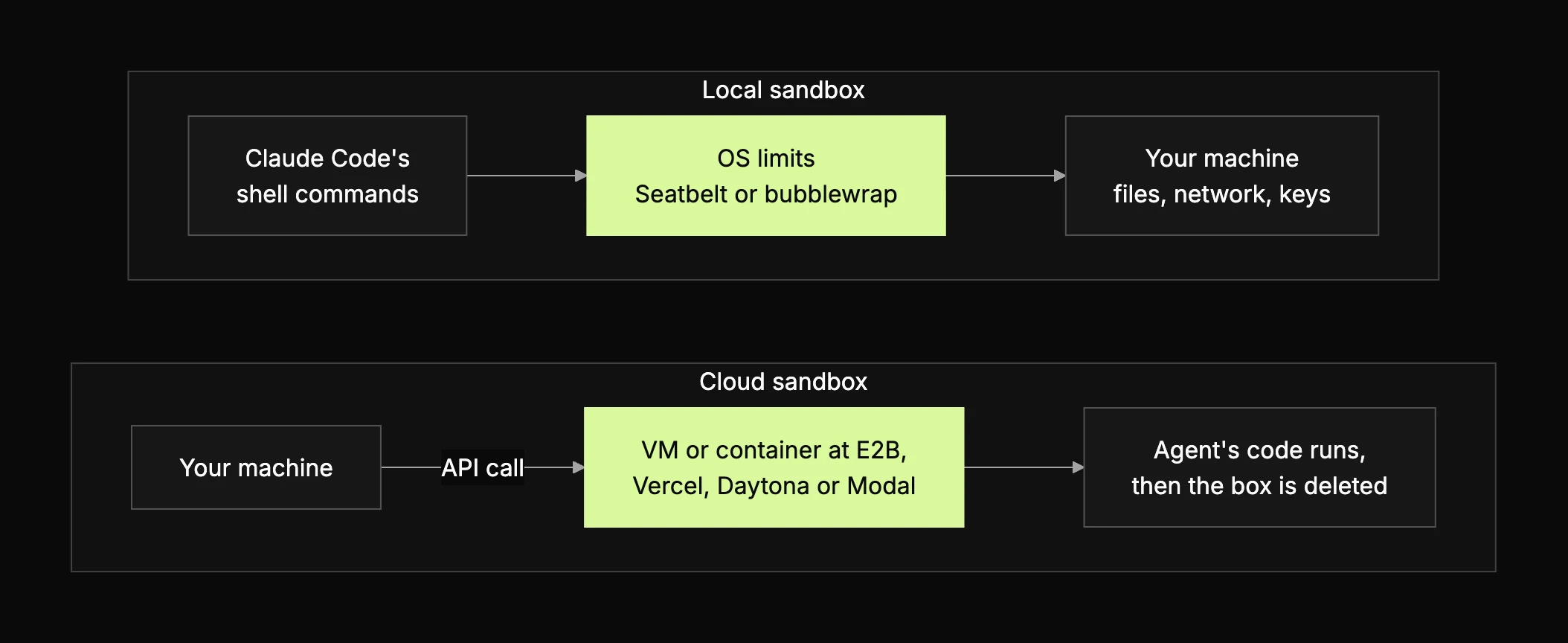
Local adds no sandbox bill but shares your machine. Cloud costs money per second but gives you real separation, and it's the only option when the agent runs on a server or in CI.
How do E2B, Vercel Sandbox, Daytona and Modal compare?
All four give you an isolated Linux machine from an API call, but they differ on isolation, session length and what a pause saves. Here's how they line up, with Claude Code's local sandbox for contrast.
| E2B | Vercel Sandbox | Daytona | Modal | Claude Code sandbox | |
|---|---|---|---|---|---|
| Runs where | Cloud | Cloud | Cloud | Cloud | Your machine |
| Isolation | Linux VM | Firecracker microVM | Linux container by default, VM optional | gVisor, or a VM | Seatbelt on macOS, bubblewrap on Linux and WSL2 |
| Startup claim | None published | "in milliseconds" | "under 90ms" | None for sandboxes | Not applicable |
| Longest session | 1 hour (Hobby), 24 hours (Pro) | 45 minutes (Hobby), 24 hours (Pro) | No hard cap. Container and GPU: 15-minute auto-stop. VM: 60-minute auto-pause | 5 minutes by default, up to 24 hours | Not applicable |
| Free to start | One-time $100 credit, no card | Hobby: 5 active CPU hours a month | $200 free compute, no card | $30 a month credit (Starter) | Included with Claude Code |
| SDKs | Python, JS/TS | JS/TS, Python, CLI | Python, TS, Ruby, Go, Java | Python, JS, Go | Not applicable |
| Save state | Pause saves files and memory | Snapshots of files and installed packages | Snapshots. VMs also pause with memory and can fork | Filesystem snapshots | Not applicable |
Sources: E2B pricing and docs, Vercel Sandbox docs and pricing, Daytona pricing, sandboxes and isolation, Modal sandboxes and pricing, Claude Code sandboxing.
Prices are where the four split hardest. Each vendor quotes a different unit, so here they are converted to the same two: one vCPU for one hour, and one GiB of memory for one hour.
| Per vCPU-hour | Per GiB-hour of memory | How it's billed | |
|---|---|---|---|
| E2B | $0.0504 | $0.0162 | Per second ($0.000014 per vCPU-second) |
| Daytona | $0.0504 | $0.0162 | Hourly rate, billed per second |
| Modal | about $0.071 | $0.024 | Per second. Sandbox rate, priced per physical core (2 vCPU) |
| Vercel Sandbox | $0.128 per active CPU hour | $0.0212 per GB-hour | CPU waiting on I/O isn't billed. Pro plan, iad1 region |
Prices checked on October 28, 2026. E2B's per-second rates ($0.000014 per vCPU, $0.0000045 per GiB) are multiplied by 3,600. Modal's $0.00003942 per physical core per second is $0.1419 an hour for 2 vCPU, and its $0.00000667 per GiB-second is $0.024 an hour. Daytona and Vercel publish hourly rates.
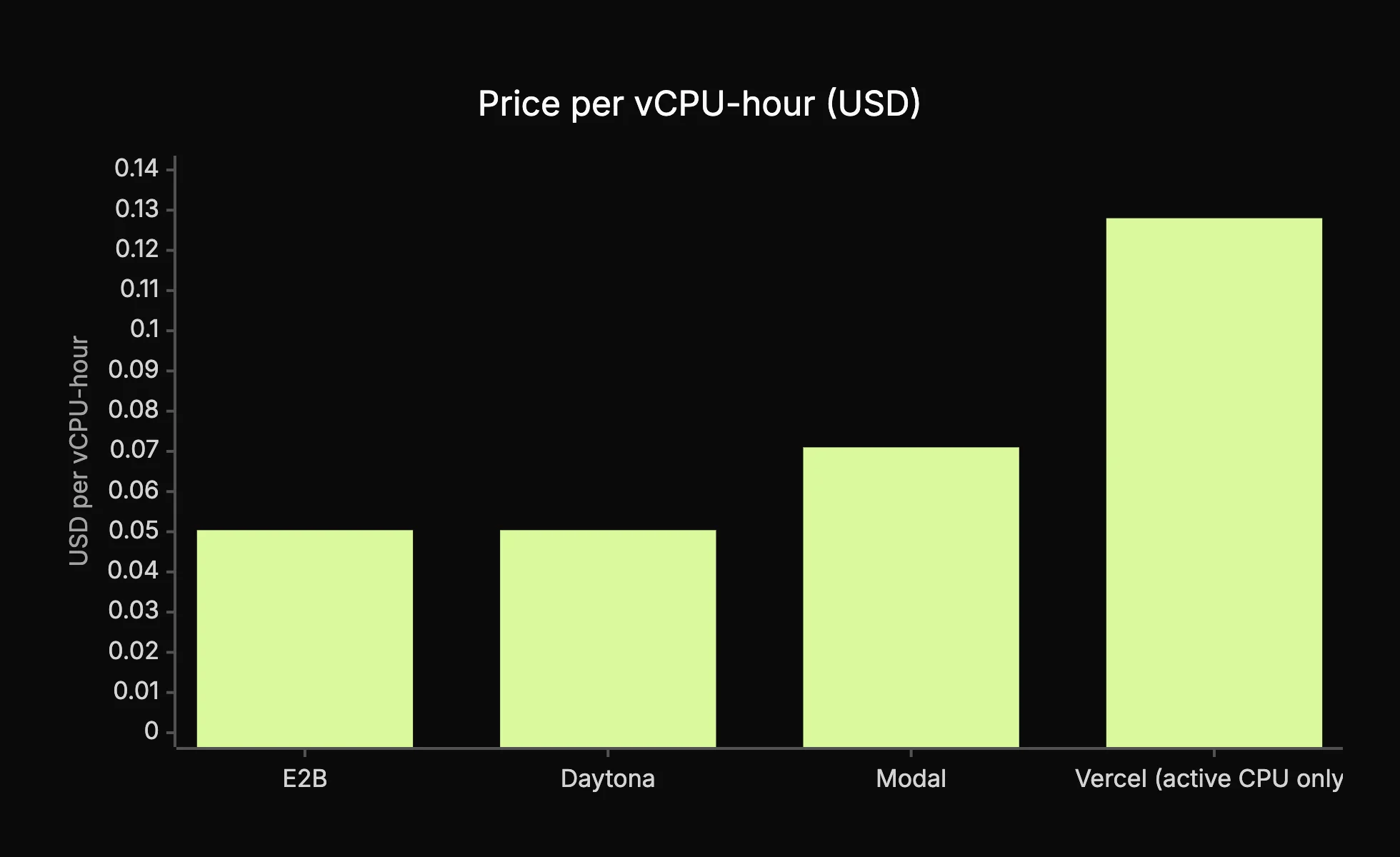
Vercel's rate counts only active CPU. Time spent waiting on the model isn't billed.
E2B and Daytona charge the same rate to the fourth decimal. Modal costs about 41% more per vCPU. Modal bills sandbox CPU and memory at its non-preemptible rate, three times its list price. Vercel still bills provisioned memory the whole time the sandbox runs, idle CPU included. And a matching CPU rate isn't a matching bill: Daytona also charges $0.000108 per GiB-hour for disk past the first 5 GiB.
Session length matters as much as price. Free tiers cut you off fast.
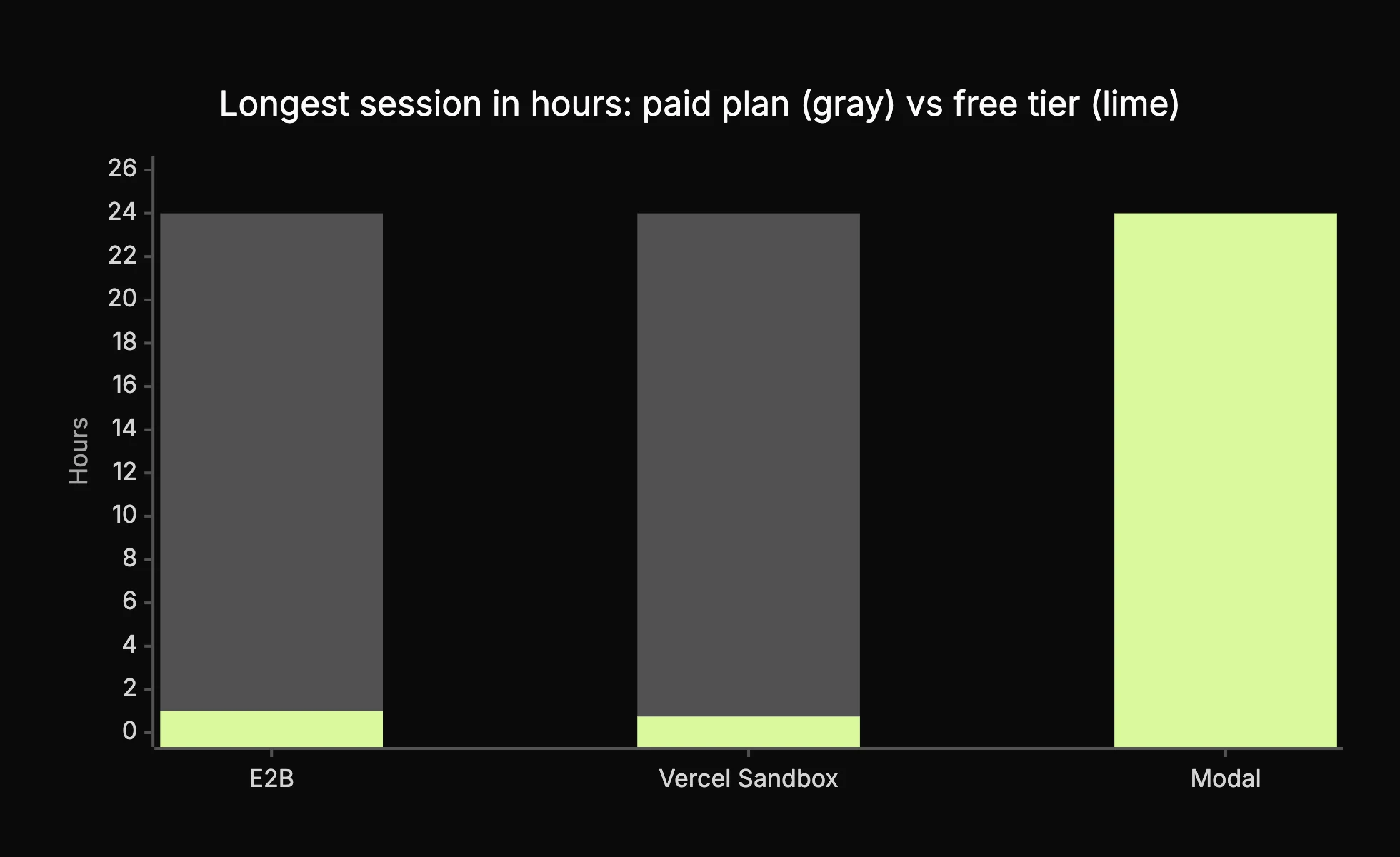
Bars show one continuous session. Daytona isn't charted because its docs state no hard session cap.
E2B's 24-hour sessions need its Pro plan, which is $150 a month plus usage. Those 24 hours cap one continuous run, not the sandbox's life: Vercel resets the limit when a persistent sandbox stops and resumes, and an E2B pause resets it too. Modal's 24 hours is a hard stop, and the way past it is a filesystem snapshot into a new sandbox. Vercel and Modal both default to a 5-minute timeout until you raise it. Daytona is the odd one: its docs state no hard cap. By default a container or GPU sandbox auto-stops after 15 minutes without toolbox, SSH or preview activity, and processes running inside it don't reset that timer, so a long build can still get stopped. GPU sandboxes are deleted when they stop. VM sandboxes auto-pause after 60 minutes instead, keeping their memory.
What does Claude Code's sandbox actually block?
Claude Code's sandbox limits where shell commands can write and connect, but not what they can read. Here's what the sandboxing docs say:
- It's off by default. Turn it on with
/sandboxin a session, or setsandbox.enabledtotruein a settings file such as~/.claude/settings.json. - Writes are limited to the working directory, a per-user temp directory and any directories you've added with
--add-dir. - Network goes through a proxy on your machine that checks each host against your allowed domains. That list starts empty, and the first time a command needs a new domain, Claude Code asks you to approve it.
- It covers shell commands only. Claude's file tools, MCP servers and hooks run outside it, with your full access.
- If it can't start, the command runs anyway. When a dependency is missing or the platform is unsupported, Claude Code runs commands unsandboxed. Set
sandbox.failIfUnavailabletotrueto make it exit instead. - A failed command can be retried outside it. Claude may rerun a command with
dangerouslyDisableSandbox. SetallowUnsandboxedCommandstofalseto block that. - Native Windows isn't covered. The sandbox runs on macOS, Linux and WSL2.
Reads are the surprise. By default a sandboxed command can read most of your machine, including ~/.ssh and ~/.aws/credentials.
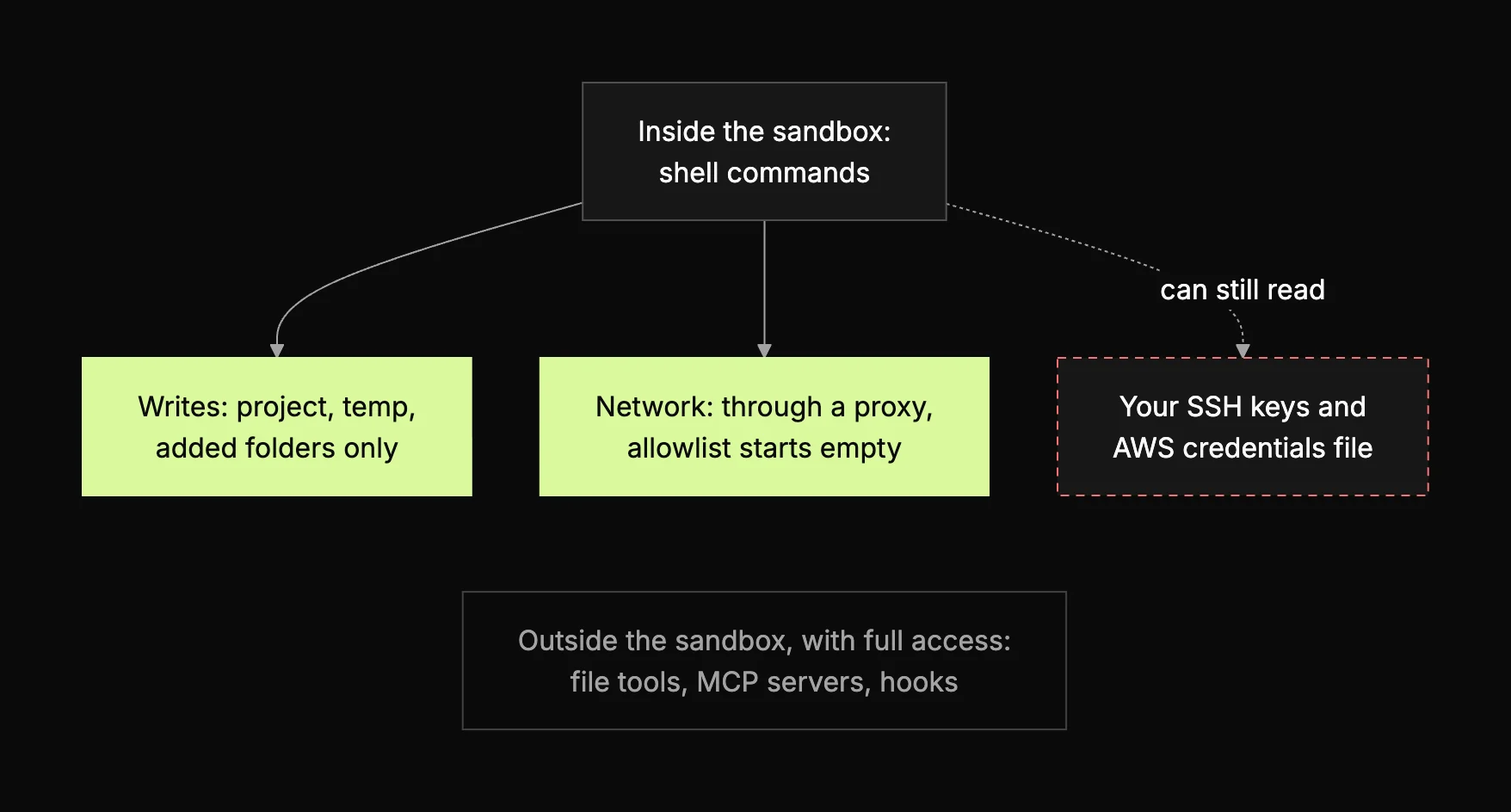
There's no built-in credential deny list, so add your own. This block from the docs blocks ~/.ssh and the AWS credentials file and strips two tokens:
{
  "sandbox": {
    "enabled": true,
    "credentials": {
      "files": [
        { "path": "~/.aws/credentials", "mode": "deny" },
        { "path": "~/.ssh", "mode": "deny" }
      ],
      "envVars": [
        { "name": "GITHUB_TOKEN", "mode": "deny" },
        { "name": "NPM_TOKEN", "mode": "deny" }
      ]
    }
  }
}
It's a good seatbelt for a laptop, not a wall. The docs themselves call it "not a complete isolation boundary." For unattended agents, the sandbox environments page points you at containers, VMs and cloud sessions instead.
Can you run a real browser inside an AI sandbox?
None of the four vendors document a supported headless Chromium or Playwright setup in their default code sandboxes. E2B ships a separate desktop sandbox SDK, and Daytona can start a headed desktop over VNC inside a sandbox built from its default snapshot. E2B also documents a Kernel template where Playwright in the sandbox connects to a browser running outside it, on Kernel's infrastructure. Vercel and Modal say you can run Docker inside some sandboxes.
This matters because a passing type check can't tell an agent that its UI change works. It needs to load the page, click the button and see the result. That's the gap covered in how to test AI-generated code before it ships.
At Bug0, a forward-deployed engineer writes the tests on Bug0 AI, every run happens in a real cloud browser, and the engineer reviews each failure before it's reported. If you're choosing a browser layer for an agent yourself, Expect vs agent-browser vs Stagehand compares the options.
Buildful shows the full loop in a shipping product. It's a coding agent that runs every task in its own cloud sandbox: the sandbox is created for the task, the change is checked and tested in a real browser inside it, and the sandbox is deleted when the task ends.

Which AI sandbox should you pick?
Pick by the one constraint you can't work around. Most teams have one.
- Longest single continuous session: Daytona. No wall-clock cap. Turn off the container auto-stop, or the VM auto-pause, to use it. On paid plans, the other three cap one continuous run at 24 hours.
- Lowest cost while the agent waits on a model: Vercel Sandbox, since CPU waiting on I/O isn't billed.
- Most SDK languages: Daytona, with Python, TypeScript, Ruby, Go and Java.
- Pause with memory intact: E2B, or Daytona's VM sandboxes. Both save the filesystem and memory on pause, so running processes survive.
- Forking: Daytona, on its VM sandboxes only.
- GPUs: Modal or Daytona, which offers NVIDIA H100, H200 and B200 sandboxes. E2B's sandboxes are CPU-only.
- Running on your own laptop: Claude Code's sandbox. Turn it on and add your credential deny rules first.
Frequently asked questions
What is an AI sandbox?
An AI sandbox is an isolated machine where code written by an AI agent runs without touching your computer or credentials. Usually it's a short-lived cloud VM or container, deleted when the task ends. Claude Code also offers a local one that uses OS-level limits.
What is E2B?
E2B is a cloud service that gives AI agents a Linux VM on demand through Python and JavaScript SDKs. It bills per second, at $0.000014 per vCPU-second, and new accounts get a one-time $100 credit with no card. Sessions last up to 1 hour on the free Hobby plan and 24 hours on Pro.
Who competes with E2B?
The closest competitors are Vercel Sandbox, Daytona and Modal. Daytona matches E2B's price exactly at $0.0504 per vCPU-hour. Vercel bills only active CPU, Modal and Daytona offer GPUs, and Modal gives a choice of gVisor or VM isolation.
How do I sandbox Claude Code?
Run /sandbox in a Claude Code session, or set sandbox.enabled to true in ~/.claude/settings.json. Then add deny rules for ~/.ssh and other credential files, because reads aren't limited by default. Set sandbox.failIfUnavailable to true so commands don't silently run unsandboxed.
Is Claude Code's sandbox safe enough?
For catching accidents on your own laptop, yes. It limits writes and network access for shell commands, but file tools, MCP servers and hooks run outside it, and Anthropic's docs say it isn't a complete isolation boundary. For unattended agents, use a container, VM or cloud sandbox.
How long can an AI sandbox run?
On paid plans, E2B, Vercel Sandbox and Modal cap one continuous session at 24 hours. Pausing an E2B sandbox or resuming a Vercel one resets that clock. Free tiers are shorter: 1 hour on E2B and 45 minutes on Vercel. Daytona's docs state no hard cap, and a sandbox keeps running if you turn off auto-stop and set no wall-clock TTL. A VM sandbox still auto-pauses after 60 minutes unless you turn auto-pause off.
Which AI sandbox costs the least per hour?
E2B and Daytona tie at $0.0504 per vCPU-hour and $0.0162 per GiB-hour of memory. Vercel's $0.128 per active CPU hour can work out cheaper for agents that mostly wait, since I/O wait isn't billed.
Can AI code escape a sandbox?
Breaking out of a VM or container takes a bug in the kernel, gVisor or the hypervisor. The more common leak needs no escape: anything the sandbox can read, it can send over any network connection you allow. Keep the allowed domains short and deny credential files, and an escape has little to take.