
tldr: UAT stands for user acceptance testing. It is the final check before release, where the people who will actually use the software confirm it does what they need, not just what the spec said. This guide covers the process, the types, a checklist, a test case template, and a straight answer on what AI can take off a UAT team's plate.
Most testing asks whether the software works. UAT asks a harder question: does the software do the job the business actually needed it to do. Those are not the same thing, and the gap between them is where projects fail without anyone noticing until launch.
A feature can pass every automated test and still be wrong. It does exactly what the ticket said, and the ticket misunderstood what the user needed. Unit tests will not catch that. Regression suites will not catch it. Only a real user, running a real task, notices that the thing works perfectly and solves the wrong problem.
That is what UAT is for. It is the last gate before go-live, run by business users or end users rather than engineers, checking the product against real-world needs. This guide covers what UAT is, how to run it, the types you should know, a practical checklist, and where automation helps versus where it cannot.
What is user acceptance testing?
User acceptance testing (UAT) is the phase where the intended users of a system validate that it meets their needs and works in real-world scenarios before it goes live. UAT is also called acceptance testing, end-user testing, or beta testing depending on the context.
The distinction from other testing is who runs it and why. QA testing is done by testers against requirements. UAT is done by users against reality. A tester confirms the software matches the spec. A user confirms the spec was right in the first place, and that the software fits how they actually work.
UAT comes last, after unit, integration, system, and regression testing have all passed. By the time a build reaches UAT, it should already work in the technical sense. What UAT adds is the business sense: is this acceptable to ship to the people who depend on it.

The UAT process, step by step
A UAT cycle has a repeatable shape. Skipping steps is how UAT turns into a rushed thumbs-up that catches nothing.
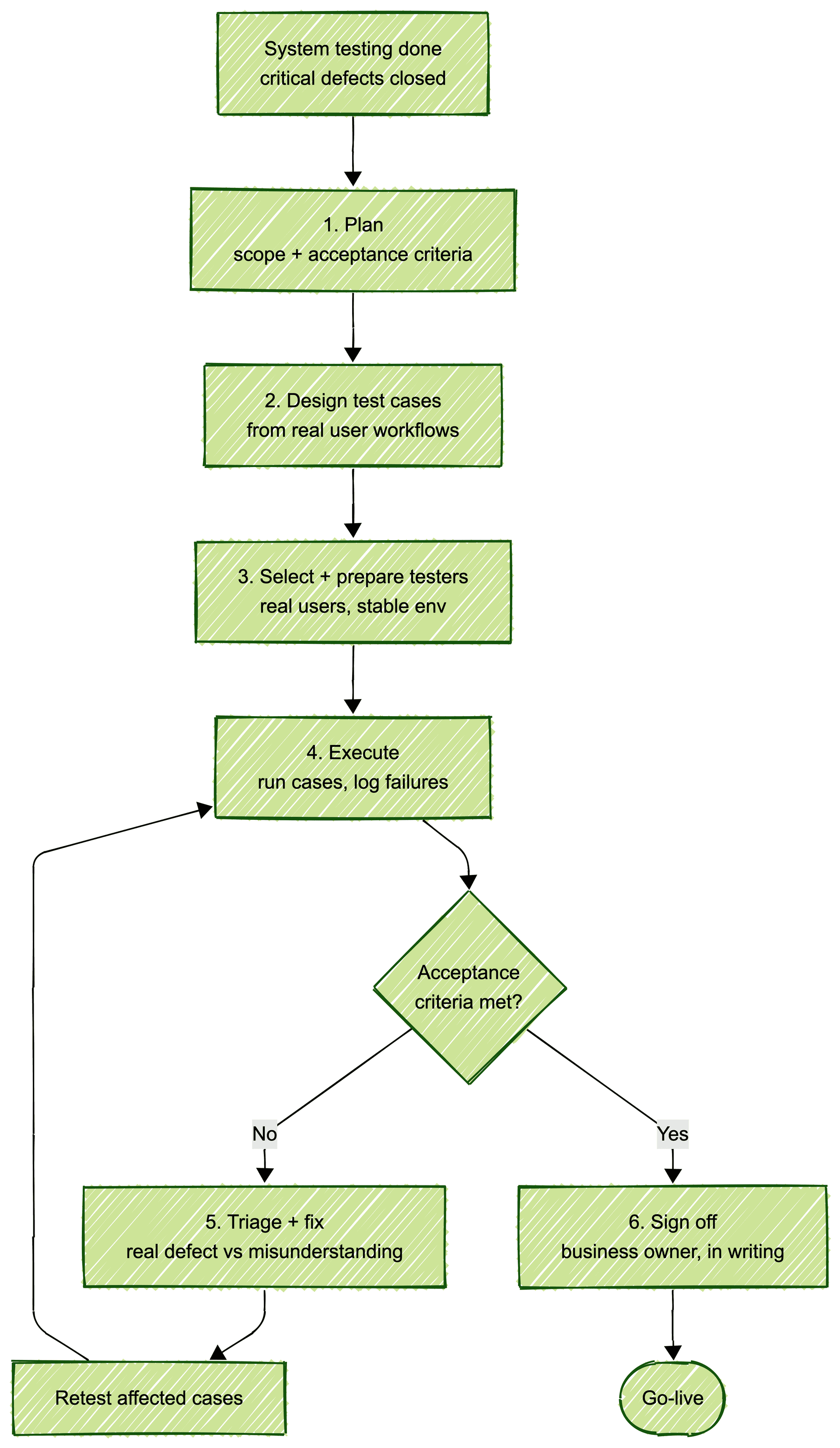
- Plan. Define the scope, the acceptance criteria, and who the testers are. The criteria come from business requirements, and they are the standard the software will be judged against. Set entry criteria too: UAT starts only when system testing is complete and critical defects are closed, otherwise users spend their time finding bugs QA should have caught.
- Design test cases. Write UAT cases from real user workflows, not technical specs. Each case should describe a task a real person does, in their language.
- Select and prepare testers. Choose actual business users or end users, not the engineering team. Give them a stable environment with realistic data.
- Execute. Testers run the cases, complete the workflows, and record whether each one met the acceptance criteria. Failures are logged with enough detail to reproduce.
- Triage and fix. The team reviews failures, separates real defects from misunderstandings, fixes what needs fixing, and the affected cases are retested.
- Sign off. Once the acceptance criteria are met, the business owner formally accepts the release. That sign-off is the gate to go-live. Make the exit criteria explicit: every criterion tested, no open critical defects, and any known issues listed and accepted in writing.
The step teams cut under deadline pressure is retesting after fixes. A fix that introduces a new problem, checked by nobody, is how a UAT-approved release still breaks on launch day.
Types of UAT
UAT is an umbrella. Knowing the specific type you are running keeps the scope honest.
- Alpha and beta testing. Alpha runs internally, late in development, with staff acting as users. Beta runs externally, with real users in their own environment, before general release.
- Business acceptance testing (BAT). Validates that the software delivers the intended business value and fits the business process, not just that it functions.
- Contract acceptance testing. Confirms the software meets the criteria written into a contract. Common when a vendor builds for a client against agreed specifications.
- Regulation acceptance testing. Confirms the software complies with legal and regulatory rules that apply to the domain, such as finance or healthcare.
- Operational acceptance testing (OAT). Checks the operational readiness of the system: backups, maintenance procedures, security, and recovery. Less about features, more about running the thing safely.
Most teams mean business acceptance or beta testing when they say UAT. The others are named because they are legally or operationally distinct, and calling them by the right name keeps everyone clear on what is being signed off.
A UAT checklist
A UAT cycle that begins without the basics in place produces noise instead of signal. Split the checklist into three moments.
Before UAT starts:
- Acceptance criteria are written and agreed with the business owner.
- The UAT environment is stable, production-like, and separate from development.
- Test data is realistic and reflects real-world cases, including edge cases.
- Test cases are written from user workflows, in user language.
- Testers are real business or end users, and they know how to log a failure.
- Entry criteria are met: system testing is done and known critical defects are fixed.
During UAT:
- Failures are logged the day they are found, with steps, the data used, and a screenshot.
- Triage runs daily or every other day, separating real defects from misunderstandings and bad test data.
- Fixes are retested by the person who found the failure, not only by the person who fixed it.
- Progress is tracked against the full case list, so nobody discovers an untested area on the last day.
Before sign-off:
- Every acceptance criterion maps to at least one executed, passing test case.
- Open defects are reviewed and either fixed or explicitly accepted as known issues.
- The named business owner signs off in writing. Verbal approval evaporates under post-launch pressure.
UAT test case example and template
A UAT test case is not a QA test case with a different label. It describes a task in the language of the person doing it, with a business outcome as the pass condition.
A workable template needs five fields:
| Field | What goes in it |
|---|---|
| ID | A short reference, like UAT-014 |
| Scenario | The task in user language: "Send a monthly invoice to a client" |
| Steps | The clicks and inputs a real user would take, briefly |
| Expected result | The business outcome, not the UI state |
| Status | Pass, fail, or blocked, with a link to the defect if it failed |
Filled in for a billing feature, it looks like this:
| ID | Scenario | Expected result | Status |
|---|---|---|---|
| UAT-014 | Create an invoice from a completed order | Invoice totals match the order, tax is correct for the client's region | Pass |
| UAT-015 | Send the invoice to the client by email | Email arrives with a working payment link and a PDF attached | Fail, DEF-201 |
| UAT-016 | Client pays through the payment link | Payment records against the invoice, status changes to paid | Blocked by UAT-015 |
Two details in that table do real work. The expected results name business outcomes, money, tax, and delivery, not screen elements. And UAT-016 is marked blocked rather than skipped, which tells the release owner exactly what remains unverified if they ship anyway.
UAT challenges, and where automation actually helps
UAT has chronic problems. Some are organizational, some are technical, and only the technical ones have an automation answer, so keep them separate.
The organizational ones first. Business users have day jobs, so testing time is scarce and gets booked late. Test environments wobble mid-cycle and take testers' confidence down with them. And defect reports from non-testers are often a bare "it doesn't work," with no steps, which sends engineers chasing ghosts. The fixes are process, not tooling: book testers' time like a real project commitment, freeze the environment for the cycle, and give people a two-minute reporting template instead of a blank form.
The problem automation does not solve is judgment. UAT exists because a human has to decide whether the software is acceptable for real work. An AI cannot be the user in user acceptance testing. It has no stake in the outcome and no lived sense of the job. Anyone selling you fully automated UAT is redefining the term.
The problem automation does solve is everything around that judgment. Most of a UAT team's time is not spent judging. It is spent re-running regression checks by hand, waiting for a stable build, and sifting through failures that turn out to be known bugs that should never have reached them. That is idle time and bottleneck, and it is exactly what drags UAT from days into weeks.
This is where continuous automated testing changes the shape of UAT. If a strong end-to-end suite runs on every deploy and catches regressions before UAT (why self-healing tests matter), the build that reaches your business users is already clean of the technical noise. Their time goes to the one thing only they can do: deciding whether it does the job.
That is the model behind managed QA (what managed QA is). With Bug0, a forward-deployed engineer builds and maintains that end-to-end safety net on Passmark, our AI testing engine, so regressions are caught upstream and human UAT is spent on acceptance, not on rework. The humans keep the judgment. The machine takes the busywork that was crowding it out.
FAQs
What does UAT stand for?
UAT stands for user acceptance testing. It is the final testing phase before a software release, where the intended users confirm the system meets their real-world needs and is acceptable to go live.
What is the difference between UAT and QA testing?
QA testing is done by testers to confirm the software matches its requirements and works technically. UAT is done by actual users to confirm the software fits how they work and solves the right problem. QA checks against the spec; UAT checks against reality.
Who performs user acceptance testing?
Real business users or end users, not the engineering or QA team. The whole point is that the people who will depend on the software are the ones deciding whether it is acceptable. A product or business owner usually gives the final sign-off.
What is a UAT environment?
A UAT environment is a stable, production-like setup, separate from development, where user acceptance testing runs. It uses realistic test data so users can complete real workflows without the instability of an active development build.
Can UAT be automated?
Not fully. The acceptance judgment requires a human who understands the real-world job, and no AI can stand in for that. What can be automated is the regression testing around UAT, so the build that reaches users is already free of technical defects and their time goes to real acceptance decisions.
When does UAT happen in the software testing lifecycle?
Last. UAT runs after unit, integration, system, and regression testing have passed. The build should already work technically by the time it reaches UAT. UAT adds the final business validation before go-live.
How long does user acceptance testing take?
Typically one to four weeks, depending on scope and how available the business testers are. The biggest schedule killers are unstable environments and regression noise reaching testers. Clearing both, which is what continuous automated testing upstream does, is how teams get UAT down to days.