
tldr: Playwright tests APIs through the request fixture, an HTTP client with its own cookie storage and access to your config's baseURL and headers. It is a strong choice for API tests that live next to browser tests, and the standout use is hybrid: seed state over the API, assert in the UI, and cut minutes of clicking out of every run. It is the wrong tool for contract testing, load testing, and schema validation at depth.
Playwright ships an HTTP client alongside the browser. Every test gets a request fixture that speaks the same configuration language as the rest of the suite, which means one runner, one config, and one report can cover your API endpoints and your UI.
Whether Playwright for API testing is the right choice depends on which of three jobs you are hiring it for. Pure API suites: workable. Hybrid API-plus-UI tests: the best reason it exists. A replacement for a dedicated API platform: no, and the honest boundary is below. Code samples here were executed against Playwright 1.62.1.
The request context, and the cookie detail that matters
There are two ways to make an HTTP call in a Playwright test, and they differ in one important behavior.
The request fixture is an isolated APIRequestContext per test. It picks up baseURL and extraHTTPHeaders from config, and keeps its own cookie storage, unrelated to any browser.
page.request belongs to the page's browser context. It sends the browser's cookies and writes Set-Cookie responses back into the browser. Call your API through page.request after a UI login and you are authenticated; call it through the request fixture and you are anonymous.
That is the debugging trap in most hybrid suites: an API call that works in one test and 401s in another usually differs only in which of these two clients made it.
Writing an API test
Configuration first, so tests stay short:
// playwright.config.ts
export default defineConfig({
  use: {
    baseURL: 'https://api.example.com',
    extraHTTPHeaders: {
      'Accept': 'application/json',
      'Authorization': `token ${process.env.API_TOKEN}`,
    },
  },
});
Then the test is a request and an assertion:
test('creates an item over the API', async ({ request }) => {
  const created = await request.post('/api/items', {
    data: { name: 'first item' },
  });
  expect(created.ok()).toBeTruthy();

  const list = await request.get('/api/items');
  expect(await list.json()).toContainEqual(
    expect.objectContaining({ name: 'first item' }),
  );
});
request.post() serializes data as JSON and sets the content type. Status, headers, and body are all assertable, and since 1.62, apiResponse.timing() exposes resource timing when a slow endpoint is the thing under test.
The hybrid pattern: seed by API, assert in the browser
This is where Playwright beats both a pure API tool and a pure browser suite. UI tests spend most of their runtime creating the state they intend to look at. The API can do that part in milliseconds:
test('new item appears in the list', async ({ request, page }) => {
  const seeded = await request.post('/api/items', {
    data: { name: 'seeded row' },
  });
  expect(seeded.ok()).toBeTruthy();

  await page.goto('/items');
  await expect(page.getByText('seeded row')).toBeVisible();
});
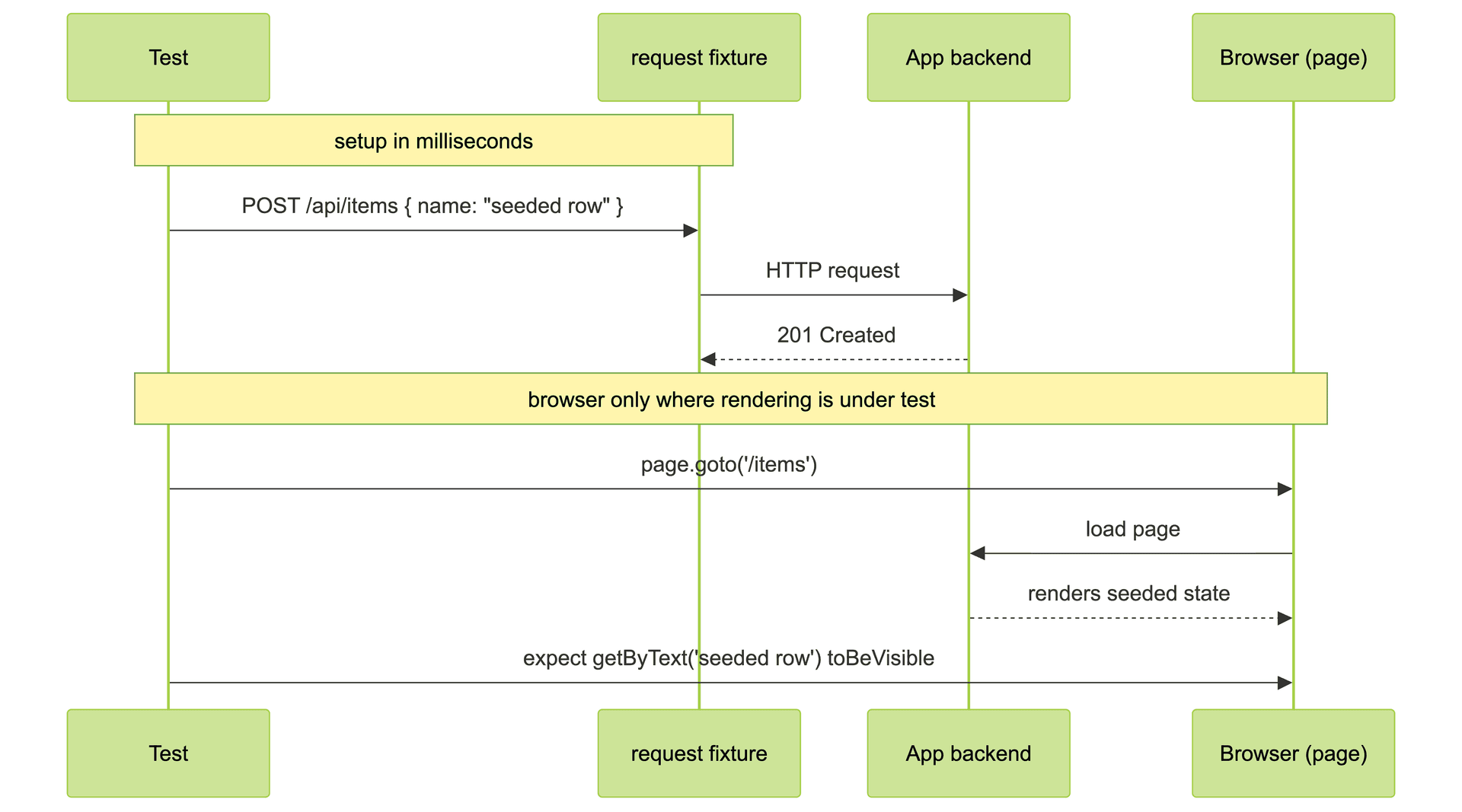
The test verifies what actually needs the browser, the rendering, and skips the clicking that was never the point. Across a suite this is routinely the difference between a 40-minute run and a 15-minute one, and the same economics shape how a Bug0 engineer structures suites on Bug0 AI: state moves over the API, and browser time goes only where rendering is the thing under test. The same trick works in reverse for teardown, deleting over the API what the UI test created.
For authenticated hybrids, log in once over the API, save the session with storageState, and hand it to browser contexts:
const requestContext = await request.newContext({
  httpCredentials: { username: 'user', password: 'passwd' },
});
await requestContext.get('https://api.example.com/login');
await requestContext.storageState({ path: 'state.json' });

const context = await browser.newContext({ storageState: 'state.json' });
When Playwright is the wrong tool for API testing
The Reddit thread ranking for this exact question asks whether Playwright is overkill for API-only testing, and the answer deserves precision rather than defense.
If no test in the project ever opens a browser, Playwright brings a browser-automation dependency you do not need, and a lighter HTTP test stack does the same job. Contract testing belongs to purpose-built tools; Playwright has no consumer-driven contract model. Schema validation at depth means an OpenAPI-aware tool, not hand-written expect calls per field. Load testing is out of scope entirely; one worker pool on one machine is not a load model.
The decision rule: Playwright for API tests that share a life with browser tests, dedicated tooling for API programs that stand alone.
FAQs
Can Playwright test APIs without a browser?
Yes. The request fixture makes HTTP calls directly, no page involved, and a pure API spec file runs headless-nothing. The browser only launches for tests that use page or context.
What is the difference between the request fixture and page.request?
Cookie storage. The request fixture is isolated per test with its own jar; page.request shares the browser context's cookies in both directions. Use page.request when the call must ride a UI login session, and the fixture when the API is the thing under test.
Playwright vs Postman for API testing: which one?
Postman-class tools win for API-first workflows: collections, contract and schema tooling, monitors, and a UI for exploration. Playwright wins when API checks live inside an end-to-end suite and you want one runner and one CI report. Teams often run both, with Playwright owning only the hybrid cases.
How do I set auth headers for all API requests?
Put them in use.extraHTTPHeaders in playwright.config.ts, alongside baseURL. Every request fixture call inherits them. For a session-based login instead of a token, authenticate once with a request context and persist it via storageState.
Can Playwright mock API responses?
Yes, but that is a different feature. page.route() intercepts requests the browser makes and can fulfill them with stubbed responses, which lets UI tests run against a mocked API. The request fixture is the opposite direction: it calls the real API. Mock with routes when the UI is under test, call with request when the API is.
Does Playwright validate API schemas?
Not natively. You can assert on any part of a JSON body, and you can wire a JSON-schema library into your expects, but there is no built-in OpenAPI awareness. Suites that need systematic schema validation should pair Playwright with a dedicated validator or keep that layer in an API-first tool.

